Comparison · For solo affiliate operators · 7 min read
Kit vs MailerLite for a New Affiliate Content Site (2026)
Which email tool wins for a new affiliate content site — MailerLite or Kit? Hands-on findings on both platforms, real pricing math, no creator-economy bias.
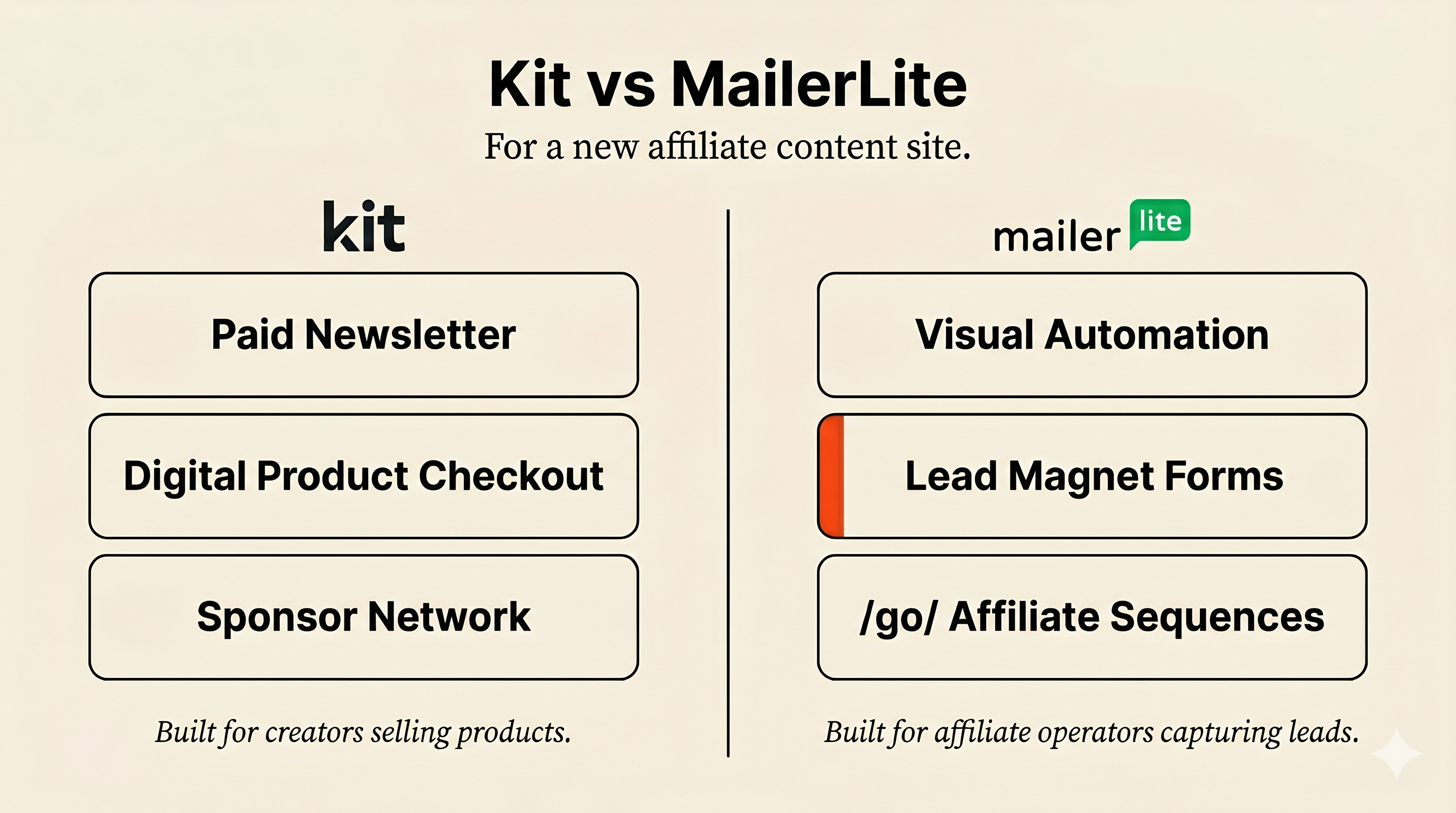

Most “Kit vs MailerLite” comparisons treat both as email tools for creators. For a new SEO-led affiliate content site, that framing leads to the wrong tool choice.
You’re building an affiliate content site. You need an email tool. Kit or MailerLite — which one?
Short answer: MailerLite for affiliate-content operators who need automation early. Kit for creators selling digital products or running paid newsletters. The decision depends on whether you’re monetizing through /go/ affiliate redirects forwarded from blog content, or through products you sell directly to your audience.
If you’re still deciding between WordPress and Systeme.io as the platform layer, start with Systeme.io vs WordPress for Beginners first. This article picks up after the platform decision.
How I’m comparing these tools
- MailerLite: I ran a 30-minute hands-on test on a fresh free-tier account — signup, onboarding flow, automation builder, sequence creation, landing pages.
- Kit (formerly ConvertKit): I ran a fresh-account signup, completed the onboarding survey, tested the sequence builder, created two sequences to check whether the free tier enforces a count limit (it doesn’t), and confirmed the post-trial paywall model.
- Pricing: Verified live on both vendors’ pricing pages on 2026-05-21.
- Deliverability: Not used as a recommendation reason. Third-party tests vary, and deliverability depends more on sender reputation, list quality, authentication, and content than on platform choice. Don’t decide on this without your own seed-test data.
- Recommendation scope: SEO-led affiliate content sites — comparison articles, BOFU recommendation sequences,
/go/redirect monetization. Not a general email-marketing comparison. Agencies, ecommerce brands, SaaS newsletters, and established creators may reach different conclusions.
The decision this article actually answers
This article is for an affiliate content site publishing comparison articles, capturing leads with checklists or quick-win lead magnets, and sending 3–5 email recommendation sequences with /go/ affiliate links.
Four email flows the right tool needs to handle:
- Lead magnet flow — checklist download → welcome email → comparison page link → product recommendation
- Topic segmentation — subscribers interested in AI writing tools versus hosting versus email tools get different sequences
- BOFU follow-up — reader clicks a “best email tool” article → 3-email sequence comparing options with
/go/redirects - Reactivation — cold subscribers re-engaged after 60–90 days of no opens
The question becomes: which platform handles these flows at the lowest credible operational cost? Not “which platform is better” in the abstract.
Quick verdict
Pick MailerLite if you’re building an affiliate content site, the email list grows from blog readers, and you forward subscribers to /go/ affiliate links.
Reasons:
- 47–62% cheaper at every paid tier above free (see pricing table below)
- Usable automation on the free tier — Kit’s automation is paywalled after a 14-day trial
- Visual workflow builder with branching triggers (Kit’s sequences are linear newsletter editors with delays)
Pick Kit if you ARE the product:
- You sell digital products, run paid newsletters, or want sponsorships via the Kit Sponsor Network
- The premium pricing buys creator-economy features MailerLite doesn’t have
Kit exception worth naming, even though it’s narrow: if your strategy is newsletter-first — build a list to 10,000 subscribers via existing audience or paid channels, then monetize through newsletter advertising or future product launches — Kit’s free tier (10k subs, unlimited broadcasts) carries you further than MailerLite’s 500-subscriber cap. This is a real exception, but it’s not the default path for a new SEO-led affiliate site. A cold-start affiliate content business is unlikely to capture 10,000 subscribers before needing basic automation. The exception applies when the newsletter itself is the product/distribution channel, not when it supports a content site.
Don’t run both. You’ll split subscriber history, duplicate forms, complicate unsubscribe handling, and fragment attribution. Migration penalties detailed in the switching-cost section.
Pricing math — the real numbers
| Subscribers | MailerLite (Growing Business) | Kit (Creator, monthly) | Delta | % cheaper |
|---|---|---|---|---|
| 500 | $0 (free tier) | $0 (free tier, newsletter-only post-trial) | — | tied differently |
| 1,000 | $15/mo | $39/mo | $24/mo | 62% |
| 5,000 | $39/mo | $89/mo | $50/mo | 56% |
| 10,000 | $73/mo | $139/mo | $66/mo | 47% |
Real range: MailerLite is 47–62% cheaper than Kit at the 1k–10k paid tiers using monthly pricing. Annual billing narrows the gap slightly (Kit’s annual rate is ~15% off monthly).
Break-even logic for an affiliate-content operator:
| Tool monthly cost | Affiliate conversion (avg $25 commission) | Sales needed/month |
|---|---|---|
| $15 (MailerLite at 1k subs) | $25 | 1 |
| $39 (Kit at 1k subs, OR MailerLite at 5k) | $25 | 2 |
| $73 (MailerLite at 10k subs) | $25 | 3 |
| $89 (Kit at 5k subs) | $25 | 4 |
| $139 (Kit at 10k subs) | $25 | 6 |
The operator question: how many affiliate conversions does my list need to generate per month to justify the paid tier? At Kit’s pricing, you need 2× the conversion rate to break even versus MailerLite at the same subscriber count. That assumes equivalent commission per sale. Real numbers vary — Hostinger pays ~$60 cap one-time, Systeme.io pays 60% lifetime recurring, Kit/MailerLite pays ~30% recurring — but the asymmetry holds across affiliate program types.
The affiliate-operator comparison table
Generic feature grids miss what affiliate operators actually care about. Here’s the comparison rebuilt around real decisions:
| Affiliate-operator question | Better fit |
|---|---|
| Can I run lead magnet → welcome → BOFU recommendation sequence cheaply? | MailerLite |
| Can I delay paid upgrade while building a simple newsletter list (no automation)? | Kit (10k free subs, newsletter-only post-trial) |
| Can I tag subscribers by interest/content topic without paying early? | MailerLite |
| Can I monetize directly through paid newsletter / sponsorships / digital products later? | Kit |
| Can I keep costs low after 1k/5k/10k subscribers? | MailerLite |
| Can I avoid paying for unused creator features? | MailerLite |
| Can I use native sponsorship/product features later? | Kit |
| Can I get a visual automation canvas with branching triggers? | MailerLite |
| Can I embed forms across 20–50 articles without rebuilding them? | MailerLite (both support it; MailerLite’s free-tier form builder is more permissive) |
Kit wins on subscriber capacity at the free tier (10,000 vs 500) and on creator-monetization features when those are active. MailerLite wins on automation depth at the free tier and on paid-tier cost curve at every scale.
MailerLite — the affiliate-content operator default
Where MailerLite wins:
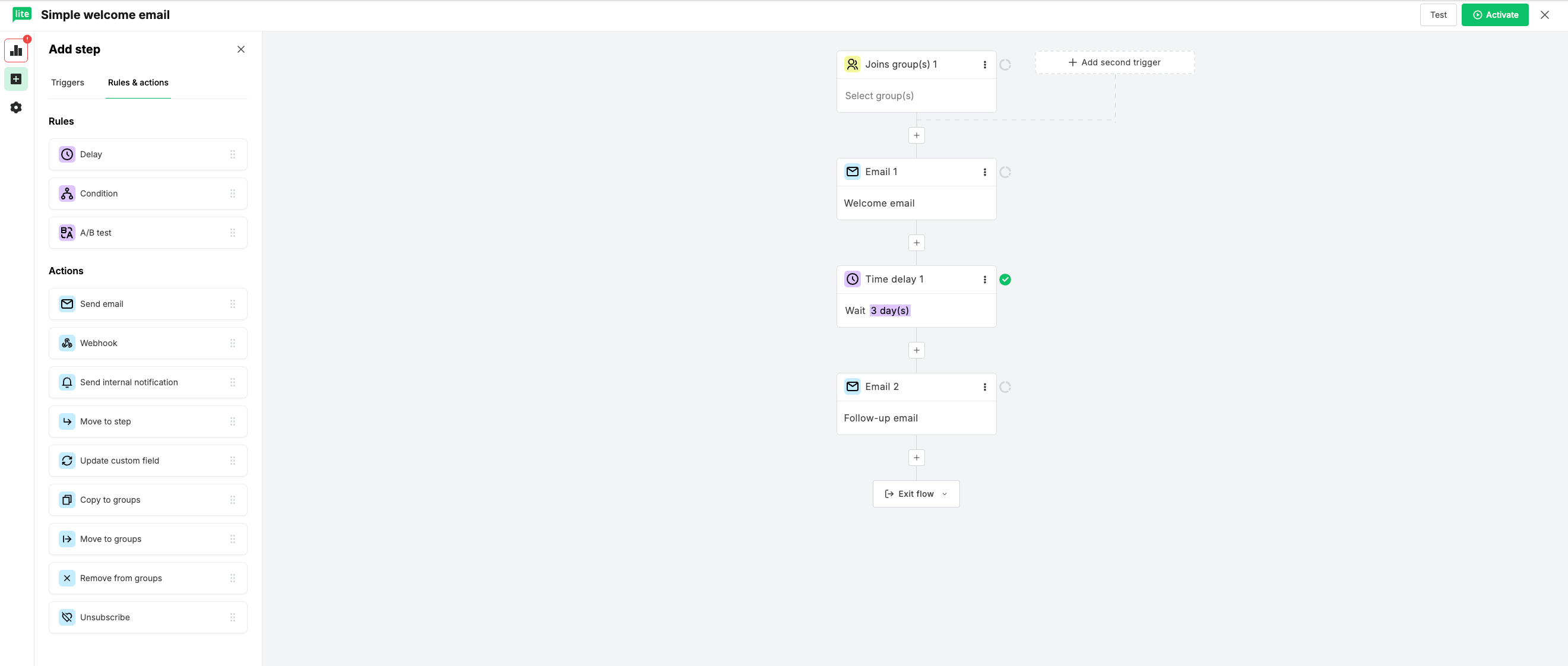
- Usable automation on free tier — a visual builder with branching triggers and if/then logic. For an affiliate funnel that needs topic segmentation from day one, this matters more than subscriber capacity. Specific limits: MailerLite’s free tier supports multiple workflows; the constraint is the 500-subscriber ceiling, not the automation count.
- Cost curve favors growth. $10/mo entry vs Kit’s $33 annual / $39 monthly. At 5,000 subscribers, $50/mo cheaper. At 10,000, $66/mo cheaper. Annual savings at 10k: ~$792.
- No transaction fees on digital products. If you ever add a low-ticket digital product alongside affiliate links, MailerLite’s Stripe integration charges 0%. Kit Commerce charges 3.5% + $0.30 per sale (scoped to Kit Commerce users; doesn’t apply if you process sales through Gumroad, ThriveCart, or Systeme.io).
- Form builder works on free tier. Embedded forms, popup forms, landing pages — all available without upgrade. Critical for affiliate sites embedding lead-capture forms across multiple articles.
Where MailerLite disappoints:
- 500-subscriber free tier ceiling is not a small issue. Most affiliate sites running paid traffic or a strong lead magnet can hit 500 in 1–3 months. Once you cross, you’re paying $15/mo — affordable but not free.
- MailerLite has a recent track record of reducing its free tier. The current 500-subscriber cap is a reduction from 1,000 subscribers — the change pushed a wave of operators to hunt for alternatives on Reddit and forum threads in 2025. If you’re optimizing for long-term free-tier stability, factor in that the headline number you’re signing up for today is not necessarily what you’ll have in two years. Kit’s free tier has been more stable historically, but Kit’s paid tier pricing has been moving in the other direction — Reddit’s “Kit is getting expensive” threads track that trajectory. Both platforms can change their pricing model; neither is permanent. Plan for the possibility you’ll need to migrate eventually regardless of which you start with.
- Onboarding friction matters because beginners are the target reader. MailerLite gates new users through a 4-step dashboard checklist (Create email → Brand styles → Add subscribers → Connect domain) before fully releasing the app. Experienced operators may find it patronizing.
- First-run automation UX has real rough spots. From the hands-on:
On a brand-new account, the “pick a subscriber group” dropdown looks broken because there are no groups yet — you have to start typing into the field before the “Add a new group” option appears. The step library’s actions don’t do anything until you’ve clicked the ”+” between steps to reveal a drop slot — easy to miss the first time. Six clicks from blank canvas to fully-configured trigger. Forgiving once you learn the rhythm; not great as a first-time experience.
- Vendor verification needed on free-tier limits. MailerLite’s free tier allows automation, but specific feature flags (advanced segmentation, dynamic content, A/B testing) may be restricted — verify against current vendor docs at signup.
- Landing-page templates are functional but not premium. Acceptable for lead magnet pages; not a substitute for purpose-built landing-page tools like ConvertBox or LeadPages.
Don’t pick MailerLite if:
- You expect to grow past 500 subscribers before paid revenue justifies the $15/mo upgrade
- Your strategy is newsletter broadcasting, not automation-led funnels
- You’re planning paid newsletters, digital products, or sponsorships within the next 90 days
- You want creator-network or sponsorship-discovery features
MailerLite pricing (renewal pricing, not promo): Free: $0/mo, 500 subscribers, 12,000 emails. Growing Business: $10/mo entry, $15 at 1k subs, $39 at 5k, $73 at 10k. Advanced: $18/mo entry.
If MailerLite is your pick, my affiliate link earns me a commission. Doesn’t change your price.
Kit — the creator-economy default
Where Kit genuinely wins:
- 10,000-subscriber free tier ceiling for pure newsletter broadcasting. If your strategy is “build a list, send weekly broadcasts, no automation required,” Kit’s free tier carries you to 10,000 subscribers at zero cost. MailerLite caps you at 500. This is Kit’s strongest case.
- Creator-economy features native. Kit Sponsor Network (paid sponsorships), paid newsletters, built-in digital product checkout, creator profile pages.
- Substack-adjacent positioning. Kit Sponsor Network gives newsletter operators access to sponsorship inventory they couldn’t access alone.
- Forms on the free tier are unlimited. Useful if your lead-capture strategy needs many form variants across content.
Where Kit creates friction (verified by hands-on):
- Onboarding survey + payment modal pattern. Kit gates you behind a 6-step pre-dashboard survey (audience size, business name, creator type, website, end goal) before app access. When the survey ends, a credit card form slides over with an annual plan pre-selected. The 14-day trial is already running; the modal is asking for payment to continue past it.
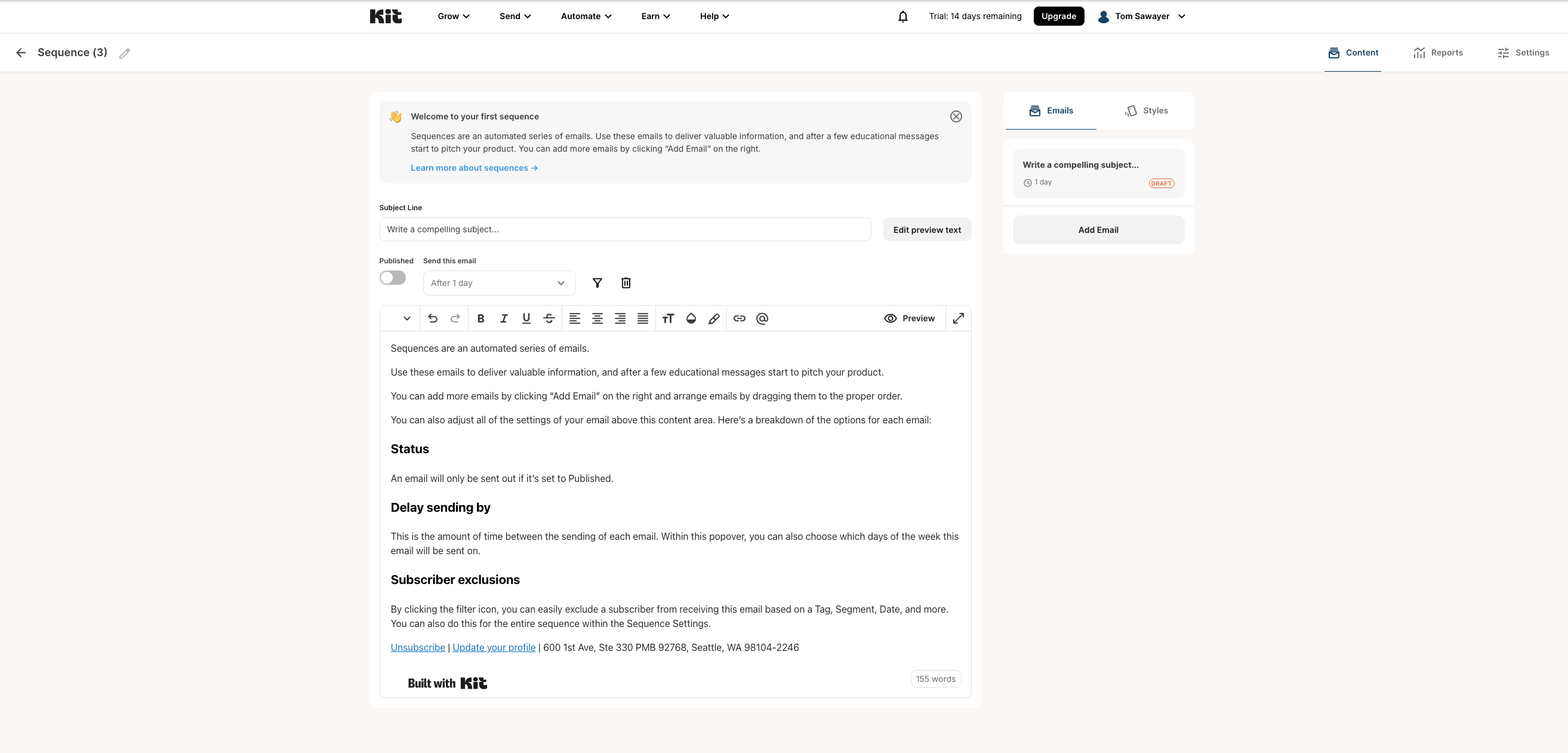
- The “automation builder” is a linear newsletter editor with delays. Kit’s Sequences feature looks like an email draft with a “send after N days” dropdown wired to the top. No visual canvas, no branching triggers, no condition splits. For affiliate operators who need topic segmentation, this is the deciding limitation.
- Free-tier gating is feature-based, not quantity-based. Unlimited sequences during the 14-day trial — no count limit. After the trial expires without payment, the entire automation surface (Sequences, Visual Automations, Rules, Apps, RSS) reverts to paywalled. Every entry in the Automate menu shows a “Paid feature” badge. Post-trial free-tier reality: 10k subscribers + unlimited newsletter broadcasts + zero automation.
- Premium pricing kicks in early. $39/mo at 1,000 subscribers — creator-tier money before most affiliate operators have validated their offer.
From the Kit hands-on:
Kit’s onboarding is more gated than MailerLite’s, not less. A 6-step survey pre-dashboard, then an immediate credit card form pre-selecting an annual plan even on a free trial. When I finally reached Sequences and clicked “New Sequence,” I expected a visual canvas. Instead I got a newsletter draft with a “send after 1 day” dropdown wired to the top. I created a second sequence to check the free-tier limit — nothing happened, no paywall, no warning. The catch isn’t how many sequences you can build; it’s that the whole feature carries a “Paid feature” tag the moment the trial clock runs out.
The synthesized comparison: MailerLite says “here’s the automation tool, free until you cross 500 subscribers.” Kit says “here’s everything, for 14 days, and then automation is paywalled forever.”
Break-even logic for Kit’s Creator-tier premium:
Kit’s $39–$139/mo earns its cost when it replaces other tools you’d otherwise pay for. Directionally true: paid newsletter platform, digital product checkout, sponsorship workflow, course delivery. Don’t treat this as automatic savings — only count tools you were genuinely going to pay for. For an affiliate-only operator with none of these features active, the Creator tier is overhead, and the free tier isn’t a viable workaround because it has no automation post-trial.
Don’t pick Kit if:
- Your business model is pure affiliate-content with no own products planned
- You need ANY automation in the first 90 days (the trial expires, then you’re paying)
- The $39/mo paid tier doesn’t have revenue to back it within 6 months
- You’re cost-sensitive and the 47–62% premium over MailerLite is meaningful
Kit pricing reality (corrected from secondary sources that cite “1 automation + 1 sequence” — stale): Newsletter (free, post-trial): $0/mo, 10k subs, unlimited broadcasts, no automation, no sequences. Creator: $33/mo annual ($39 monthly) at 1k subs, $89/mo (5k), $139/mo (10k). Pro: $66/mo annual entry.
If Kit is your pick, my affiliate link earns me a commission. Doesn’t change your price.
Minimum viable email setup for a new affiliate content site
Don’t overbuild before you have traffic. The trap most beginners fall into: spending a week configuring complex automations on a site that has 200 monthly visitors. The right order:
- One site-wide lead magnet tied to your main hub (checklist, comparison sheet, mini-guide — something operationally finished, not a 30-page ebook you’ll never write)
- One form template embedded across relevant articles via the email tool’s form builder
- One 3-email welcome sequence — confirmation, lead magnet delivery + content, single soft
/go/recommendation - One interest tag captured from the form source page (article URL or category) — enough segmentation to route future broadcasts
- One affiliate disclosure line in promotional emails (FTC pattern, top of email body, before any commercial recommendation)
- One monthly cleanup habit — review opens, unsubscribes, list hygiene
- No complex branching until 500+ subscribers AND validated conversion data
This setup runs on MailerLite’s free tier indefinitely below 500 subscribers. On Kit, it runs on the 14-day trial and then breaks unless you upgrade. That asymmetry is what makes MailerLite the affiliate-content default.
Decision by business model
Affiliate-content operator (pure affiliate, no own products): MailerLite free → Growing Business at scale. Default path.
Newsletter-first operator (build the list before monetizing): Kit free until you cross 10k subs, then evaluate. Narrow exception — applies when the newsletter itself is the product, not when it supports a content site.
Creator (digital products, paid newsletters, or sponsorships): Kit Creator from day one. The premium pays for replaced tools.
Hybrid operator (content site + course/digital product): Pick based on which side is bigger today. If affiliate is primary, MailerLite + Gumroad/Systeme.io for product checkout is cheaper. If creator economy is the bigger commitment, Kit Creator from the start.
If you don’t have traffic yet, don’t spend a week on automations. Pick the tool, create the minimum viable setup above, and get back to publishing content.
Switching cost
Beginner anxiety about email-tool choice is overblown. The real costs of switching:
- Easy: Subscriber list CSV exports. Email sequence copy (text) re-authored manually.
- Harder: Automation logic doesn’t migrate — rebuild from scratch. Subscriber tags and segments need manual remapping. Landing pages and forms don’t translate between builders.
- Painful: Domain authentication (SPF/DKIM/DMARC) redo for the new sender. Deliverability reputation rebuilds over 2–4 weeks. Form embeds across all article pages need manual replacement. Unsubscribe compliance must carry over (legal risk if it doesn’t).
The honest reframe: switching won’t kill the business — it will steal a week you wanted to spend publishing content.
When to revisit
If you’re on MailerLite, revisit when:
- You hit 500 subscribers before revenue justifies the $15/mo upgrade
- You’re launching a digital product, paid newsletter, or sponsorship within 90 days
- Onboarding friction is slowing your execution cadence
If you’re on Kit, revisit when:
- You need any automation and the 14-day trial has expired (i.e., you’re paying Creator tier for any automation at all)
- You’re 90 days in and not using paid products, sponsorships, or newsletter monetization
- You cross 1k or 5k subscribers and the $24–$50/mo premium delta becomes painful
Cross-platform trigger: business-model shift (affiliate → creator OR creator → affiliate). The email tool follows the revenue path. Revisit every 6 months.
What I’d choose
For my own beginner affiliate stack, I’d start with MailerLite unless I had a digital product planned within the next 90 days. Reasons: automation on free tier matters more than subscriber capacity, because affiliate funnels need segmentation from day one and Kit’s free tier has none post-trial. The paid-tier cost curve (47–62% cheaper than Kit at 1k–10k) means I can scale without hitting punitive pricing. If I were building a creator brand selling a paid newsletter or course — different answer. Kit’s Creator tier would be earning its keep by Day 1.
Closing
For affiliate-content operators: MailerLite is the default. For creators selling products: Kit. The newsletter-first Kit exception is real but rare for new SEO-led sites.
Next reads:
- Hostinger + Systeme.io stack — the layer below the email tool decision
- Systeme.io vs WordPress for Beginners — the platform choice that comes before
- Claude vs ChatGPT for Affiliate Content — the AI assistant decision
Affiliate disclosure: I use affiliate links for both Kit and MailerLite. Full disclosure at the affiliate disclosure page.