
Systeme.io vs WordPress — The Decision This Article Actually Answers
You're here because you've narrowed your platform choice to two: WordPress on Hostinger, or Systeme.io. Both are credible. Both are widely used by online business operators in their respective use cases. Both have an affiliate program I'm part of. The reason this article exists is that the choice between them depends almost entirely on what you're actually building — and most "Systeme.io vs WordPress" articles never ask that question. They list features. Features don't choose for you; business model does.
Two distinct readers land on this page. If you're building a content site — affiliate articles, reviews, comparisons, an SEO-led blog where revenue follows search traffic — you're a WordPress reader. If you're selling a service or productised offer — coaching, consulting, freelance work, a course, a digital download — where the customer journey is landing-page → checkout → email follow-up, you're a Systeme.io reader. The rest of this article walks both paths in detail. Section 2 gives you the verdict before the deep dive.
Here's how to read this article. Section 2 is the impatient-skimmer answer — read it, and if your situation is clear, you can stop. Section 3 is a side-by-side comparison table for at-a-glance trade-offs. Sections 4 and 5 are deep dives on each platform: pricing, where each wins, where each creates friction. Section 6 maps platforms to specific business models, including the awkward "I want both" case. Section 7 covers what happens if you pick wrong (less catastrophic than most beginners assume). Section 8 lists the triggers that should make you reopen the decision later. No income claims, no funnel-hack hyperbole, no comparisons framed against features you don't actually need.
Two things on transparency before you keep reading. First, the affiliate links you'll see in this article — Hostinger via my referral link, Systeme.io via my affiliate link — earn me a commission if you sign up. Hostinger's referral also passes a 20% discount to you on the 12-month plan. Full disclosure at /affiliate-disclosure/. Second, this comparison is one of several in the cluster — if email tooling is your next decision, see the Kit vs MailerLite comparison; if automation, the Make.com vs Zapier comparison.
The verdict's in Section 2. Read on.
Quick Verdict — WordPress for Content Sites, Systeme.io for Simple Offers
Pick WordPress on Hostinger if you're building a content site. Affiliate articles, reviews, comparisons, an SEO-led blog where the goal is to rank for search terms and let Google deliver the traffic — that's WordPress's home turf. The plugin ecosystem (Yoast or RankMath for SEO, Akismet for spam, page builders for design), the URL and schema control, and the long-term content ownership compound into a publishing asset that's harder to build on a closed platform. The cost on Hostinger Premium with my referral link is $3.19/month on the 12-month plan plus a free domain Year 1 — about $38 for the first year.
Pick Systeme.io if you're selling a service or productised offer. Coaching, consulting, freelance work, a course, a digital download — anything where the customer journey is "land on a page → buy → get email follow-up" — Systeme.io's all-in-one design removes the integration friction of stitching WordPress + Kit + Stripe + Calendly together. The free tier covers 2,000 contacts, 3 funnels, and 1 course; that's genuinely usable for the first paid customers. When you outgrow free, the Startup plan is $17/month — far less than the equivalent multi-tool stack would cost.
Don't try to pick "both" right now. Section 6 covers the hybrid case in detail, but the short version is: pick the platform tied to your first revenue path. Add the other half in Month 6 if your first half is earning enough to justify the second tool's complexity. Building both at once is overengineering for a beginner solo operator.
If your situation is unambiguous after this section, you can stop. Sections 3 through 8 are for readers who want the deeper trade-off analysis, the side-by-side comparison table, the platform-specific friction points, and the switch triggers that should make you revisit this decision later.
Side-by-Side Comparison Table
Five jobs a solo operator runs when standing up an affiliate site. Verdict per job:
| Job | Systeme.io | WordPress | Winner |
|---|---|---|---|
| Setup speed (live affiliate site) | Hours, all-in-one | Days, plugin stack | Systeme.io |
| Total cost of ownership | $0–$97/mo flat | $15–$200+/mo variable | Systeme.io |
| Built-in funnels + email + courses | Native | Plugin stack required | Systeme.io |
| Content flexibility / customization | Template-bounded | Theme + builder freedom | WordPress |
| Maintenance + security burden | Vendor-managed | Operator-managed | Systeme.io |
If you want the trade-offs at a glance before reading the deep dives, the table below covers the criteria that actually drive the platform decision for beginner solo operators. Pricing verified at publish; everything else is documented feature comparison.
| Criterion | WordPress on Hostinger | Systeme.io |
|---|---|---|
| Setup time to first published page | ~2 evenings | ~30 minutes |
| Publishing model | Long-form blog with rich SEO structure | Landing pages + funnels; basic blog feature |
| SEO control | Full (URL, schema, plugins, sitemap, robots.txt) | Limited (managed URLs, basic SEO fields) |
| Email capture | Separate tool required (Kit, MailerLite, etc.) | Built-in (3 funnels + 2,000 contacts on free tier) |
| Checkout / payments | Separate (WooCommerce + Stripe plugin) | Built-in checkout connects Stripe / PayPal |
| Cost — Year 1 with referral | ~$38 (Premium 12-month + free domain) | $0 (free tier) or ~$204 (Startup at $17/mo) |
| Cost — Year 2 standard | ~$146/year (renewal + domain) | $0 free or ~$204 Startup |
| Lock-in / portability | Low — export content, take to any host | Medium-high — funnels + emails live inside platform |
| Best fit | Content sites, SEO-led, long-form publishing | Service offers, funnels, course or digital product delivery |
Three patterns to read off the table:
WordPress wins on SEO and ownership; Systeme.io wins on speed and simplicity. That's the structural trade-off — there's no platform better at both, and the choice is about which trade-off matches your business model.
Cost difference at the start is small; cost difference at scale depends on your stack. Year 1 with my Hostinger referral is ~$38; Systeme.io Free is $0. At Systeme.io Startup (~$204/year) vs a WordPress + Kit + Stripe stack (~$38 hosting + $0 to $396 email + pay-per-transaction Stripe), the comparison flips depending on whether your email list outgrows Kit's 10,000-subscriber free tier.
Lock-in risk is asymmetric. Moving WordPress content to a different host is straightforward; moving Systeme.io's funnels, emails, and product configurations off the platform is real work. This is part of why the right answer depends on whether you're committing to "build a long-term asset" (favours WordPress) or "validate an offer fast" (favours Systeme.io).
WordPress wins on SEO and ownership; Systeme.io wins on speed and simplicity.
WordPress on Hostinger — Best for Beginner Content-Site Builders
WordPress on Hostinger is the right pick for content sites for one structural reason: you own the content, you control the URLs, and the SEO architecture compounds over time in ways closed platforms can't replicate. If your business model depends on Google delivering traffic to articles you publish — affiliate content, reviews, comparisons, tutorials, long-form blog — WordPress is the dominant publishing platform for content-led businesses, and the entire ecosystem (themes, plugins, tutorials, community knowledge) has built up around it for that reason. Below: where it wins, where it creates friction, and what it actually costs you Year 1 vs Year 2.
Where WordPress Wins
Three structural advantages:
SEO control. Plugin ecosystem covers everything — Yoast or RankMath for on-page SEO and meta tags, schema markup for rich results, sitemap generation, robots.txt control, internal-link optimisation. URLs are clean and editable. Schema customisable per content type. None of this is automatic on a closed platform.
Content architecture. Categories, tags, custom post types, related-content modules, featured-article blocks — all standard. Building topic clusters (the internal-link spine that pillar pages and BOFU comparison clusters depend on) is what WordPress was designed for.
Ownership and portability. You own the database, the files, the domain, the hosting account. Migrate to a different host any time. Export to a different CMS. Self-host on a VPS later. The compounding asset doesn't lock you in.
The fourth advantage is the ecosystem effect: every WordPress problem has been solved by someone before you. Every plugin you might need exists, often free. Every theme adapts. Every developer knows it. Switching from WordPress later is rarely necessary because the platform grows with you.
Where WordPress Creates Friction
Three friction points beginners hit in week one:
Initial decisions overload. Theme choice (10,000+ free options plus paid premium), plugin selection (Yoast or RankMath? Akismet or Cleantalk? Page builder or stock editor?), security plugin, backup plugin, caching plugin. The "decide on everything" phase can eat two weeks if you let it.
Maintenance burden. WordPress core, plugins, and themes all need regular updates. Auto-updates exist but occasionally break things. Backup discipline matters. Security plugins are recommended, not optional. Compare to Systeme.io's "the platform updates itself" model — that's a real productivity difference for a beginner running solo.
Speed and caching tuning. Out-of-the-box WordPress on shared hosting is fine for low traffic but slows down as you add plugins and content. Caching plugins (WP Rocket, W3 Total Cache) and image optimisation become necessary around the time your traffic justifies the hosting plan in the first place.
The friction is real but bounded — most of it lives in week one. By month three, you're not making theme decisions; you're publishing articles. The "WordPress tax" is mostly upfront.
WordPress Pricing Reality
The real Year-1 vs Year-2 cost picture, with my Hostinger referral applied where it counts:
- Year 1: Hostinger Premium 12-month plan = $3.19/month (~$38 total) with my referral. Free .com domain Year 1. Free plugins (Yoast or RankMath, Akismet, Wordfence, basic page builders). Theme: free defaults like Astra, GeneratePress, or Kadence cover what beginners need. Real Year-1 cost: ~$38.
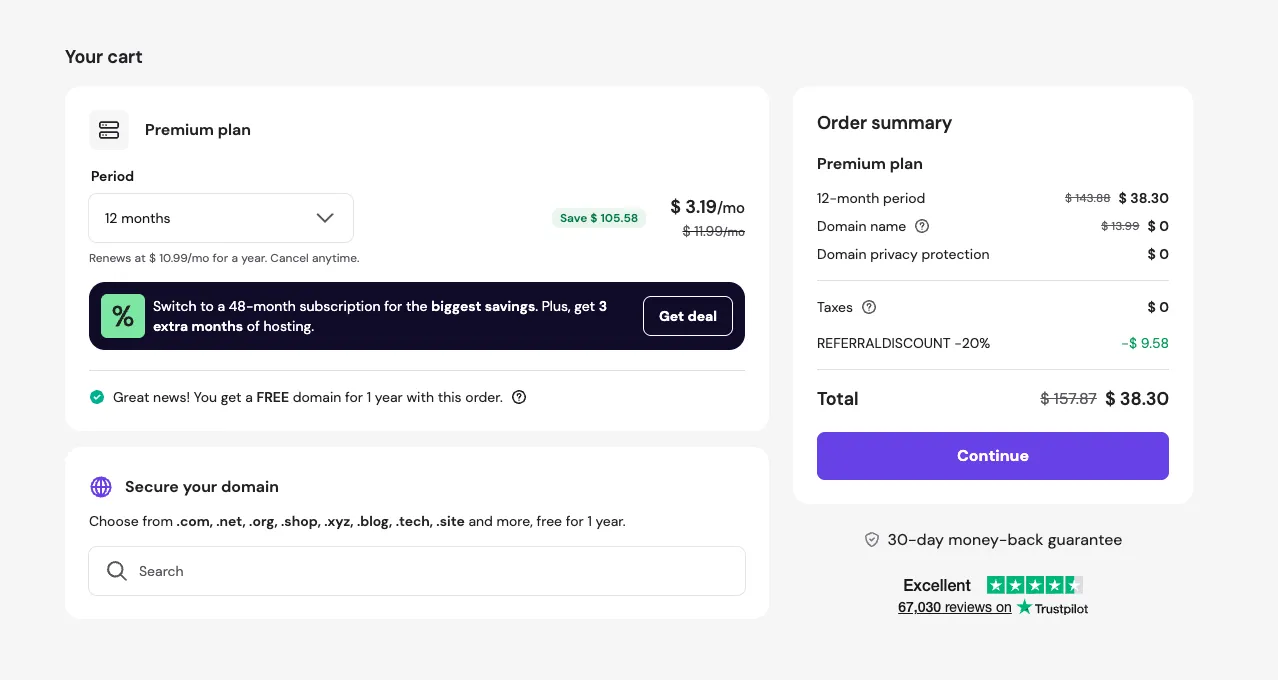
- Year 2: Hostinger Premium renews at $10.99/month standard — about $132/year. Domain renews at $13.99/year (Hostinger's standard rate, visible in the checkout cart). Real Year-2 cost: ~$146 hosting + domain.
- Optional add-ons most beginners don't need at the start: premium themes ($60–$200 one-time), paid page builder (Elementor Pro ~$59/year), premium SEO plugin tier (~$89/year for Yoast Premium or RankMath Pro). The "cheap hosting + free plugins" stack ships real, working sites; upgrades become worth their cost only after traffic justifies them.
The honest framing: WordPress + Hostinger is genuinely the cheapest credible content-site stack a beginner can run. Year 1 is impulse-buy territory ($38). Year 2 is a real recurring cost (~$146) that earns its keep if you're publishing weekly and the search-traffic compounding is starting to land. If neither of those is true by Month 12, the platform isn't the problem; the publishing cadence is.
Systeme.io — Best for Beginner Service and Offer-Led Operators
Systeme.io is the right pick for service-led businesses for one structural reason: the entire customer journey from "saw your offer" to "paid you" lives in one platform, with no integration friction between landing pages, email follow-up, checkout, and product delivery. If your business model is selling time, expertise, a productised service, or a digital product where the path to revenue is "land on a page → buy → get email follow-up," Systeme.io collapses what would be a four-tool stack on WordPress into a single account. Below: where it wins, where it creates friction, and what it actually costs across its tiers.
Where Systeme.io Wins
Three structural advantages:
All-in-one cohesion. Funnels, landing pages, email broadcasts and sequences, course delivery, digital product fulfilment, basic affiliate management, and Stripe/PayPal-connected checkout all live in the same platform. The integration tax that beginners hit when stitching WordPress + Kit + Stripe + Calendly + a course platform together — different logins, different settings pages, different ways data flows between them — disappears.
No-code execution speed. Drag-and-drop landing pages built from templates. Email sequences configured with a visual builder. Funnel logic chained with simple click rules. The first paid customer can land in production in days, not weeks. Compare to a WordPress + plugins + page builder + email integration setup, which is multiple tools to configure before the first checkout works.
The economics of a single platform — at scale. Systeme.io's Startup tier ($17/month) replaces what would be Kit Creator ($33/month) plus a course-delivery tool ($20–$39/month) plus the integration glue between them — easily $50–$80/month of separate subscriptions IF you've outgrown free tiers and need both paid email and paid course delivery. Earlier-stage operators using Kit's free tier (10,000 subscribers) plus a WordPress LMS plugin (TutorLMS or LifterLMS, both free) pay nothing — and at that stage WordPress is cheaper, not more expensive. The $17/month wins the comparison only when your stack has grown past free tiers on the multi-tool side. The Free tier (2,000 contacts, 3 funnels, 1 course) is genuinely usable for the first paid customers.
One transparency note worth surfacing here, because affiliate-recommended platforms warrant it: I earn a 60% lifetime commission on Systeme.io referrals, and that's an unusually high rate compared to most software affiliate programs. Disclosing it isn't a recommendation argument — the recommendation lives in the three structural advantages above. The commission is the commercial reality of any affiliate-monetised article; you should know it before you click any /go/ link.
Where Systeme.io Creates Friction
Three friction points to know before you commit:
Weaker long-form content depth. Systeme.io has a blog feature, but it's not built for SEO-led content businesses. URL structure is managed, schema control is limited, plugin ecosystem doesn't exist. If your business model needs to rank for search terms across a hundred-article cluster, this is the wrong platform.
Platform lock-in is real. Your funnels live inside Systeme.io's editor. Your email sequences live in Systeme.io's database. Your courses are hosted on Systeme.io's infrastructure. Migration off the platform means rebuilding most of your assets from scratch on the new tool. Contact lists are exportable; everything else is not portable in a meaningful sense.
Less design freedom. Templates cover most beginner needs but the customisation ceiling is lower than WordPress. If you want a custom theme, custom CSS across the whole platform, or a specific design language, you'll hit limits sooner than on WordPress.
These trade-offs are bounded. For a service business that needs a working sales path, none are blocking. For an SEO-led content business, the SEO friction alone disqualifies the platform.
Systeme.io Pricing Reality
The four-tier breakdown plus when each tier earns its cost:
- Free — 2,000 contacts, 3 funnels, 1 course, unlimited emails, custom domain support. Genuinely usable: most beginner service businesses start here and stay free for the first six months or more. Cost: $0/month.
- Startup — $17/month. Bumps to 5,000 contacts, 10 funnels, 5 courses, plus advanced automation rules and A/B testing. The natural upgrade once you've validated an offer and your funnels start working. Earns its cost when: your contact list crosses ~1,500 and growing, OR you need more than three funnels (typical when running a primary offer + tripwire + upsell), OR a specific automation requires Startup-tier features.
- Webinar — $47/month. 10,000 contacts, 50 funnels, evergreen webinars, run-time scheduling. Earns its cost when: webinar-led launches are your primary sales channel.
- Unlimited — $97/month. Removes contact and funnel limits, adds 1-on-1 onboarding. Earns its cost when: the business has scaled past Webinar limits — typically Year 2+ for service operators with growing email lists.
The honest pricing comparison vs WordPress: Year 1 on Systeme.io Free is $0 — genuinely cheaper than Hostinger's $38 starting cost. Year 1 on Systeme.io Startup is ~$204 — more expensive than WordPress + Hostinger ($38) on bare hosting cost alone, but less expensive than the equivalent multi-tool WordPress stack (Hostinger + Kit Creator + course platform + integration glue) at scale. The right comparison isn't "Systeme.io vs hosting cost"; it's "Systeme.io vs everything you'd otherwise stitch together."
The right comparison isn't "Systeme.io vs hosting cost"; it's "Systeme.io vs everything you'd otherwise stitch together."
Decision by Use Case — Pick Based on the Business Model, Not the Tool Demo
Sections 4 and 5 covered each platform on its own. This section is the cross-reference: which platform fits which business model. Three reader paths land here, each with a different correct answer.
If You're Building an Affiliate or Review Content Site → WordPress on Hostinger
Pick WordPress on Hostinger. The structural argument: affiliate content businesses earn revenue when articles rank in Google search, attract readers researching purchase decisions, and route those readers to affiliate links. Every step of that funnel — keyword research, content publishing, internal-link clustering, schema markup, sitemap submission, search-position tracking — is what WordPress was designed for. Systeme.io's blog feature exists, but it's not architected for content depth at the scale a real affiliate site needs (50+ articles by Month 6, 100+ by Year 1).
Choose WordPress if you can answer yes to most of these:
- Are you publishing weekly long-form content (1,500+ words, comparisons, reviews, tutorials)?
- Do you want full control over URL structure, meta tags, and schema?
- Are you planning to build topic clusters with internal-link spines?
- Will you run more than 50 articles in Year 1?
- Do you care about owning the content asset and being able to migrate hosts later?
If most of these apply to you, WordPress is the unambiguous pick. If only one or two apply, you may be on the wrong business model for this platform — revisit the other paths below.
If You're Selling Coaching, Consulting, Freelance Work, or a Productised Service → Systeme.io
Pick Systeme.io. The structural argument: service businesses earn revenue when one customer at a time finds a focused offer page, books or buys, and goes through an email follow-up sequence. The customer journey is short — landing page → checkout → onboarding email — and the platform that collapses that into a single workflow with no integration friction is materially faster to set up and easier to maintain than a four-tool WordPress stack. WordPress can do all of this with the right plugins, but the setup tax is real and the maintenance burden compounds in ways that distract a solo operator from selling.
Choose Systeme.io if you can answer yes to most of these:
- Do you have one offer to sell — a coaching package, a consulting hour, a freelance scope, a course, a digital product?
- Is your buyer journey landing-page → checkout → email follow-up (not search → article → affiliate click)?
- Do you want zero plugin maintenance, zero integration setup, zero security or backup discipline?
- Are you optimising for "first paid customer this month" rather than "compounding asset over years"?
- Are you fine with platform lock-in in exchange for a working sales system in a week?
If most of these apply to you, Systeme.io is the right pick. The free tier (2,000 contacts, 3 funnels, 1 course) covers most service businesses for the first six months at zero cost.
If You Want Both: Pick One, Grow Into the Other
You don't actually want both today. Beginner solo operators consistently overestimate how many platforms they can run in parallel, and "I want both" is usually a sign that the underlying business model isn't yet decided. Pick the platform tied to your first revenue path.
If your first revenue path is affiliate content → WordPress on Hostinger now; add Systeme.io in Month 6 or later when you've validated a paid offer you want to sell directly to your readers. WordPress stays as the SEO asset; Systeme.io becomes the conversion layer.
If your first revenue path is a service or paid offer → Systeme.io now; add WordPress in Month 6 or later when you've validated the service and want to attract more clients via search-led content. Systeme.io stays as the sales and funnel layer; WordPress becomes the content asset.
Building both at once means dividing your time across two learning curves, two maintenance burdens, two cost lines, and two unfinished sales paths. By the time either is generating revenue, you've spent twice the hours for half the result. Pick the one that matches your first 90 days of revenue work; the other half can wait.
The right rule: platforms follow business models, not the other way around. Don't pick the stack you wish you needed; pick the stack the next 90 days actually demand.
Switching Cost — What Happens If You Pick the Wrong Platform?
Most beginner buyer anxiety about platform decisions comes from the worst-case fear: "I commit, I'm wrong, I lose six months of work." That fear is mostly overblown. Here's what's actually easy to move, what's actually painful, and why most platform "switches" turn out to be platform additions.
Moving from Systeme.io to WordPress
What's easy to move:
- Email contacts. Systeme.io exports CSV; WordPress + Kit or MailerLite imports CSV. Zero friction.
- Course content (text and video). Re-upload to a WordPress LMS plugin (LearnDash, TutorLMS) or to a course platform like Teachable. The content itself is portable; only the delivery surface changes.
- Sales copy and email sequences (as text). Re-author into the new tool.
What's harder:
- Funnels and landing pages. Systeme.io's drag-and-drop builder produces output that doesn't translate to WordPress page builders. You rebuild from templates; you don't "migrate."
- URL-based traffic. If anyone bookmarked, linked, or paid-traffic-driven your Systeme.io pages, you'll need 301 redirects and patience while Google reindexes.
- Automations. Click-rule automations are platform-specific; rebuilding them inside Kit or Make.com is a fresh setup, not a copy-paste.
The honest reframe: service operators using Systeme.io often add WordPress for content marketing once the service is generating reliable revenue, rather than migrating off Systeme.io entirely. Systeme.io stays as the funnel and sales layer; WordPress becomes the SEO and content layer. Two platforms, two jobs — and you reach this stage in Month 6+ when the cost is justified by traction. At that point the platforms aren't competitors; they're complements.
Moving from WordPress to Systeme.io
What's easy to keep:
- Existing WordPress content. Your articles stay live, indexed, and earning. No reason to migrate them off.
- Domain. Either stays pointing at WordPress on Hostinger, or you point a subdomain (e.g., offers.yoursite.com) at Systeme.io while keeping the main domain on WordPress.
- SEO authority. Articles you've published continue earning search traffic regardless of what you add to the stack.
What you add (rather than migrate):
- Landing pages and funnels for paid offers. Build inside Systeme.io.
- Email capture and sequences for funnel paths. Run inside Systeme.io's built-in email tool, OR keep your existing Kit list and connect via Make.com or Zapier.
- Course or product delivery surface. Use Systeme.io's hosting infrastructure if you want one platform to manage the buyer journey end-to-end.
This direction is even cleaner than the reverse: nothing on WordPress has to change. You're adding a sales infrastructure alongside, not replacing anything. The two platforms run in parallel with clear job separation: WordPress for content discovery (top-of-funnel SEO traffic), Systeme.io for offer conversion (middle and bottom-of-funnel paid path).
The takeaway: in practice, both directions of "switching" usually mean stacking — running both platforms with each doing the job it's best at. Real platform-replacement migrations are rare and only triggered by extreme cases (cost, lock-in dispute, business-model pivot). Picking "wrong" today costs you a few weeks of rebuilt funnels at most. It doesn't cost you the business.
Picking "wrong" today costs you a few weeks of rebuilt funnels at most. It doesn't cost you the business.
Switch Triggers — When to Revisit This Decision
The platform you pick today isn't permanent. It's the right answer for the next 90 days, not necessarily for Year 3. The triggers below are the concrete conditions that should make you reopen the decision — not because you picked wrong, but because the business has grown into different needs.
If you're on Systeme.io today, revisit when:
- Your content library has grown past ~20 substantive articles and you're hitting Systeme.io's blog limits (URL structure, schema control, plugin ecosystem). At this point the SEO ceiling matters more than the all-in-one convenience.
- Your email list crosses 2,000 contacts (the free-tier ceiling) AND you find yourself building four or more funnels (the free-tier funnel limit). Either trigger alone might justify the Startup upgrade ($17/month); both together make the decision obvious.
- A paid offer has validated to the point of consistent recurring revenue, and you want SEO-led growth alongside funnel-led growth. Add WordPress at this point — don't replace Systeme.io. Stacking, not switching.
- You're paying $97/month at the Unlimited tier and the cost is sustained but not earning back its margin via more contacts or more funnels. At that scale, custom-built or self-hosted alternatives may become cost-effective.
If you're on WordPress on Hostinger today, revisit when:
- You've validated a paid offer (course, coaching package, productised service) and the buyer journey demands a real funnel — not a WooCommerce checkout, not a Calendly link, but a multi-step landing → upsell → email-sequence flow. At this point Systeme.io's all-in-one design earns its $17/month against the equivalent multi-tool stack you'd otherwise build.
- Your plugin maintenance burden — security updates, conflict resolution, performance tuning — is taking more weekly hours than your content publishing. WordPress is no longer the lowest-friction option; that's a signal the business has outgrown the "just publish" stage.
- You want to run paid traffic to landing pages and the WordPress + page-builder + tracking-pixel setup is fragile. Systeme.io's built-in conversion tools handle this with less integration risk.
- Hostinger Cloud (the upgrade path covered in Article #1's Section 6) starts looking necessary because your content site has grown past shared-hosting thresholds. At that point you're spending real money on hosting anyway; consider whether part of the spend goes to Systeme.io for the offer-conversion layer and part stays on Hostinger Cloud for the content layer.
The cross-platform trigger that fires for both starting points is the same: when the next business goal requires the other platform's strengths, the answer is rarely "migrate." It's almost always "add." Two platforms, two jobs, with each doing what it's structurally best at.
Pick the platform that matches your first revenue path. Don't optimise for the configuration you'll need in 2027 — pick for the configuration you need this month, and revisit when something on this list actually fires.
If you're running both platforms from the start, the Hostinger + Systeme.io Stack-Pairing Guide covers the split, the shared costs, and the integration points.
Your AI-assistant choice runs alongside this platform choice — see Claude vs ChatGPT for Affiliate Content for that decision.
Your automation-platform choice runs alongside this platform choice. See Make.com vs Zapier for Affiliate Operators for that decision.
Setup: the /go/ redirect system that powers the affiliate links in this article.
Disclosure architecture: FTC Affiliate Disclosure for Solo Operators — placement rules, plain-language templates, and the compliance stack behind every affiliate link on this site.