
The Decision You're Really Making — Build a Working System, Not Collect AI Tools
The stack I recommend for beginner solo operators building affiliate content sites is four tools: WordPress on Hostinger Premium for the publishing layer, Kit free tier for email, Google Analytics 4 and Search Console for tracking, and Claude as the writing assistant. No team, no agency, no investor required. This article tells you how to pick the right tier on each layer, what to skip, and exactly what it costs.
If you've spent any time researching how to start an AI-assisted online business as a beginner, you've probably been told you need ten tools, three subscriptions, two courses, and a colour-coded Notion dashboard before you can publish your first article. You don't. The recommended stack starts at $0 a month if you're patient with the AI free tiers. Around $24 a month covers the basics — what most beginners actually run for the first six months. I've run WordPress on Hostinger across multiple sites before this one; this stack is the one I'd start a new affiliate-content site with today. If you scale to the point where paid email and paid automation earn their cost, you'd be paying around $65 to $68 a month total, most of which is the AI tool and the email tool. Section 5 has the tier-by-tier breakdown. You won't find a $200-a-month recommendation in this article.
Here's the framing problem this article fixes: most "AI tool stack for beginners" content treats the question as a collecting exercise. Which AI writer should I pick? Which website builder? Which automation tool? That framing is wrong. You are not collecting software for its own sake. You are building a working operational system that publishes, captures leads, and creates a path to affiliate revenue — and that system has fewer moving parts than you've been led to believe. Pick fewer tools, run them harder, upgrade only when something concrete breaks.
Here's what you'll get from the rest of this piece: a recommended four-layer stack, the categories of software I'd avoid as a beginner solo operator, two stack variants depending on whether you're building a content site or a service business, a tier-by-tier cost breakdown, and a thirty-day execution path for the first build. Here's what you won't get: a list of every AI tool that exists, comparison tables for tools I haven't actually used, income screenshots, or "five-figure-month" framing. I publish under a content rule that says no income claims I can't back up with a real business.
Two things to know before you keep reading. First, every recommendation in this article is something I've used or vetted carefully enough to recommend, or have explicitly rejected for a documented reason. Where a comparison is based on research rather than daily operator use, that is marked in the comparison itself. Second, some of the links in this article earn me a commission if you sign up — at no cost to you. Full disclosure at /affiliate-disclosure/. Affiliate disclosure lives at /affiliate-disclosure/. Programs I declined to feature are programs whose commission wasn't enough to justify recommending an inferior tool over a better one. If you want the full compliance architecture behind these disclosures — placement rules, plain-language templates, audit checklists — see FTC Affiliate Disclosure for Solo Operators: The 2026 Compliance Architecture.
That's the frame. The next section is the stack.
Pick fewer tools, run them harder, upgrade only when something concrete breaks.
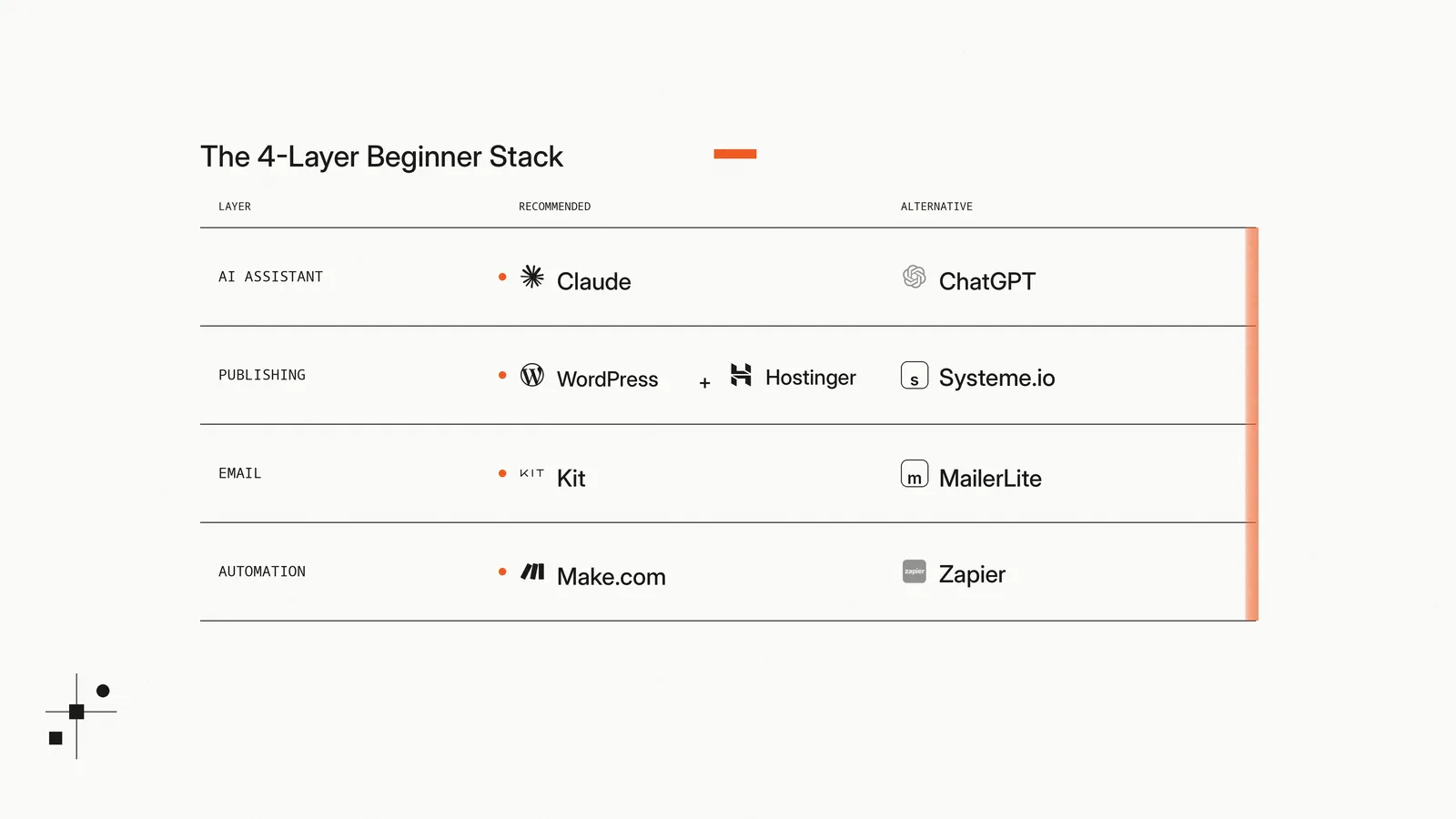
My Recommended Beginner Stack — AI Assistant, Publishing, Email, Automation
My recommended beginner stack has four layers, one tool per layer. One AI assistant, one publishing platform, one email capture tool, and one automation layer — which most beginners shouldn't pay for in the first month. Every pick below is a tool I've used or vetted carefully enough to recommend; every rejection is something I considered and walked away from for a specific reason I'll name.
Pick One Primary AI Assistant First
Pick Claude. Don't run Claude and ChatGPT in parallel until you've spent at least a month with one of them at depth.
I use Claude as my primary AI assistant for research synthesis, draft scaffolding, copy editing, repurposing across formats, and writing internal SOPs. The Pro plan is $20 a month. The free tier covers short prompts and quick edits; the paid tier removes context-window friction during long drafting sessions, multi-document research, and back-to-back article runs. Either is a defensible starting point — pick free for the first two weeks, upgrade if you find yourself capped out daily.
I rejected the run-both-in-parallel approach because it sounds like coverage and is actually friction. You end up with two half-built workflows, two prompt libraries, two voice patterns, and constant decision fatigue about which tool to open. The marginal capability difference between Claude and ChatGPT for content work is small enough that ownership of one beats partial coverage of two. Pick the one that thinks more like you and learn it deeply.
ChatGPT is the credible alternative. If your existing prompt habits are GPT-shaped, or if you specifically need DALL-E in your workflow, ChatGPT Plus is $20 a month and roughly comparable for written work. The decision is operational, not capability-driven — pick whichever interface you actually like opening.
For the full comparison — pricing per tier, the four jobs that matter, and switch triggers — see Claude vs ChatGPT for Affiliate Content.
Treat AI as the productivity layer underneath the work, not the work itself. The reader of this site doesn't care whether I drafted with Claude or ChatGPT. They care whether the comparisons are honest and whether I've used the tools I'm recommending. AI accelerates the writing; it doesn't replace the operator. Section 5 will tell you when free tier is enough and when paid is worth it.
Pick One Place to Publish
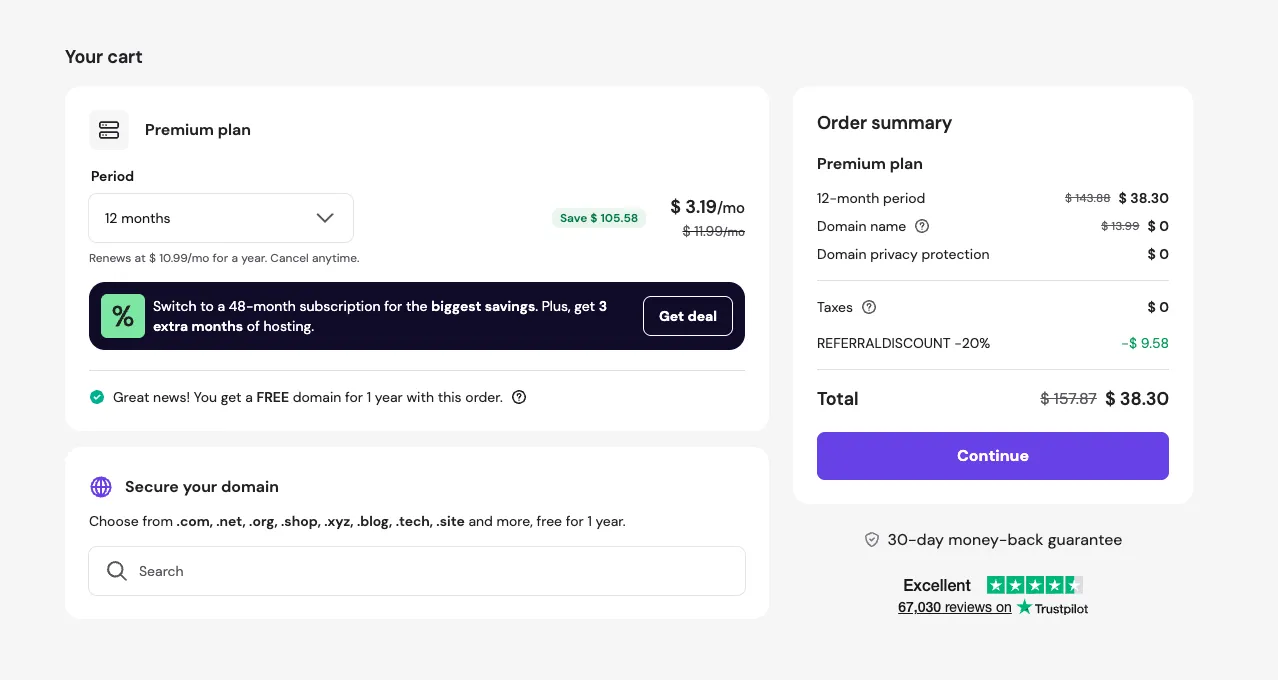
Pick WordPress on Hostinger. The Premium Web Hosting plan is $3.19/mo on a 12-month plan when you click through my referral link — about $38 for Year 1, including a free domain. Without the referral, the same 12-month plan is $3.99/mo. Year 2 onwards renews at $10.99/mo at standard pricing. If you're confident you'll stick with the project for several years, the 48-month prepay drops the rate to $2.99/mo plus 3 months free — but that's a four-year commitment to make on day one, which I wouldn't recommend until you've published consistently for at least a quarter.
WordPress is the boring, well-trodden, beginner-appropriate default. It runs the largest share of the internet for a reason: pick a theme, install a few plugins, write posts, hit publish. Hostinger is the cheapest credible host for a new WordPress site and bundles a free domain in Year 1, which removes one of the early decisions from your plate. If you've come across static site frameworks like Astro or Hugo in your research, skip them at this stage — they carry a code-editor learning curve that's not worth the optimization for someone shipping their first ten articles.
I rejected the funnel-first approach for content-site builders. If your business model is going to be affiliate content — blog posts, reviews, comparisons — long-form text people find through search — you need a real website, not a funnel page. Funnel builders are optimised for one-page-to-checkout flows, not the index-thirty-articles-and-let-Google-rank-them workflow that affiliate content requires.
Systeme.io is the credible alternative for a different audience: operators selling a service or a small digital product where the entire customer journey is landing-page → checkout → email-follow-up. If you don't plan to publish a blog and your business model is offer-first, the all-in-one Systeme.io approach is faster to set up, has a usable free tier, and removes the WordPress-plugin maintenance overhead. The Systeme.io vs WordPress for Beginners comparison unpacks the full head-to-head; if you're not sure which side of the line you fall on, read that one before committing. If you already know you want both — Hostinger for content and Systeme.io for offers — the Hostinger + Systeme.io Stack-Pairing Guide maps the split, the shared costs, and the integration points.
If WordPress sounds intimidating: it's not. The pieces you actually have to learn in week one are: choose a theme, install Yoast or RankMath for SEO, install a basic page builder if your theme is bare. Hostinger has a one-click WordPress install. A non-technical person can take this from cold start to first published article in two evenings.
Pick One Email Capture Tool
Pick Kit's free tier. Most beginners won't outgrow it until they cross the 10,000-subscriber ceiling or need automation features the free tier won't run.
I run Kit on the free tier. Kit (formerly ConvertKit) lets you collect up to 10,000 subscribers without paying anything — which is more than most affiliate sites accumulate in their first eighteen months. The free tier handles capture forms, single-email broadcasts, and a basic welcome sequence. That's all you need at the start.
I rejected paying for Kit Creator until I needed automation features the free tier doesn't run. Creator is $33/month on monthly billing (or $390/year if you prepay annually) and the price scales with list size from there — so paying before you have a list, or before a specific automation justifies it, is paying for capability you can't use yet. $33/month is $396 a year before the list earns anything. A paid email subscription with no list is one of the largest unforced costs an early-stage online business carries — and the easiest to defer.
MailerLite is the credible alternative. Its free tier is more limited (up to 1,000 subscribers) but the long-form-email aesthetic and the drag-and-drop builder appeal to writers who prefer richer formatting than Kit's clean-and-spartan defaults. For the full head-to-head — pricing math, automation depth on free tiers, and which tool fits an affiliate-content workflow — see Kit vs MailerLite for a New Affiliate Content Site.
The honest answer for most readers right now: a capture form on three pages of your site, Kit free tier, one welcome email, leave it. Don't optimise list growth before you have content. If you're not publishing weekly, a paid email tool is buying horsepower for a car that isn't running.
Add Automation Only After You Repeat the Same Task Twice
Don't pay for an automation tool in your first thirty days. Most beginners do this backwards: they buy automation before they have a workflow worth automating, then spend hours building flows that connect tools they're barely using yet.
The right rule is concrete: when you find yourself doing the same multi-step task by hand for the third time, that's the signal an automation is worth building. Not before. Until then, the time you'd spend learning Make.com or Zapier is better spent publishing articles. A workflow that doesn't exist can't be automated.
I rejected Zapier as my own automation tool. Zapier's pricing scales aggressively the moment you cross the lowest paid tier; the per-task cost adds up faster than most operators expect. Make.com's pricing is materially better at the kind of low-volume scenarios beginners actually run — the free plan covers 1,000 credits per month, and the Core plan runs around $9 to $11 per month (depending on monthly vs annual billing) for 10,000 credits, which is more than most content sites use stitching together a couple of integrations.
Zapier is the credible alternative if you're already inside the Zapier ecosystem at work or in another business — the muscle memory transfers. Or if you specifically need an integration Make.com doesn't support, which is rare at the beginner level.
The Make.com vs Zapier comparison unpacks the full head-to-head. If you're past the "repeated-task" trigger and ready to actually build something, read that one. If you're still in your first thirty days, skip both and write your fifth article instead.
The Stack I Would Avoid as a Beginner Solo Operator
Most articles in this category list the tools you should buy. Almost none list the tools you shouldn't. That's the more useful list — when you have limited capital and limited time, the wrong purchase is more expensive than no purchase, because the wrong tool wastes both money and the hours you spend learning it.
What follows are the categories of software I'd actively recommend you skip in your first six months as a beginner solo operator. None of these are bad tools — most are genuinely useful at scale. They're just wrong for your stage.
Enterprise CRMs. HubSpot Sales Hub Professional, Salesforce Starter, ActiveCampaign Plus — all in the $25 to $90+ per-seat-per-month range. These are sales-team tools. You don't have a sales team. You have a contact form and an email address people can reply to. A Google Sheet with three columns — name, email, last contact — does ninety percent of what an enterprise CRM does for the first hundred customers. Add complexity when complexity earns its keep, not before.
Premium SEO suites. Ahrefs, Semrush, Moz Pro — typically $99 to $150 per month at the entry tier. These tools were built for in-house SEO teams managing dozens of client sites. As a beginner with one site and zero published articles, you're paying for keyword data you can't act on faster than you can publish. Free tiers of Ubersuggest and Google Keyword Planner cover what you actually need at the start. Revisit paid SEO tools at Month 3 once you have ten articles published and need to find the next ten.
Project-management platforms with paid seats. ClickUp Business, Asana Premium, Monday Pro — $11 to $20 per seat per month. You're a solo operator. You don't need shared workspaces, custom roles, or audit logs. Notion's free tier or a single Trello board handles solo project management for years. Paying per-seat for software designed for teams of five is the textbook example of buying capability you don't have headcount to use.
"Software-bundle" courses. The pattern: a $1,997 course that promises to teach you affiliate marketing and "comes with" subscriptions to a CRM, an email tool, a landing-page builder, and a course platform — usually owned or affiliated with the course creator. The economics are ruthlessly against you. The bundled tools are typically inferior to the standalone alternatives I've recommended above, and the course content is rarely worth what you'd pay for it without the bundle. Buy tools because they fit your business need, not because they came packaged with someone's pitch.
Productivity-app stacks. Notion paid tier, Roam, Obsidian Sync, RescueTime Premium, the third Pomodoro timer this month. These are not business tools. They are operator-comfort tools. Until your business is paying for them, they're your hobby. The first six months is for shipping articles, not optimising your task-list aesthetic.
The pattern across all five categories is the same: you don't have the headcount, traffic volume, or operational complexity that would earn the cost. When in doubt, default to free tiers and revisit at Month 3 with actual usage data to justify the upgrade.
When in doubt, default to free tiers and revisit at Month 3 with actual usage data to justify the upgrade.
The Beginner Stack by Business Model
The four-layer stack — AI assistant, publishing platform, email tool, automation — covers most of what a beginner solo operator needs. But how you wire those layers together changes depending on what you're actually building. The two configurations below cover the businesses most readers of this site are starting: an affiliate-monetised content site, and a simple service business selling time or expertise.
Newsletter-only operators and product-first SaaS founders aren't covered here — different audience, different stack. If that's you, this article is the wrong starting point.
Affiliate Content Site Stack
If your plan is to publish reviews, tutorials, comparisons, and BOFU articles that earn affiliate revenue when readers click through and buy — this is your stack:
- Claude Pro (or ChatGPT Plus) — $20/month. Used for outlines, draft scaffolding, copy editing, and repurposing articles into video scripts and email content.
- WordPress on Hostinger Premium — $3.19/month with my referral link on a 12-month plan. Free domain for Year 1, and a familiar publishing surface every theme on the internet supports.
- Kit free tier for email capture — covers up to 10,000 subscribers without paying. Set up a single capture form on three pages and a one-email welcome sequence.
- Internal /go/ redirect links for affiliate URLs (
/go/{tool}) on your own domain. This is non-negotiable. These redirects let you swap affiliate URLs in one place when commission programs change, and they keep your raw affiliate links out of share-quality URLs. - GA4 + Google Search Console for traffic and search-position tracking — both free.
- A basic SEO plugin — Yoast or RankMath. Both have free tiers that cover what beginners need.
Skip the automation layer until you've shipped at least ten articles and find yourself doing the same multi-step task by hand for the third time. Skip the project management tool. Skip the analytics suite. The whole stack runs around $24/month.
For this configuration in practice, see my own tool stack — devonkorr.com is a slight variant of this exact build (Astro instead of WordPress for the publishing layer, but everything else the same). For the WordPress vs Systeme.io decision specifically, see the Systeme.io vs WordPress for Beginners comparison.
Simple Service Business Stack
If you're selling a service — coaching, consulting, freelance work, a small productised offer — your stack pivots away from publishing-first and toward landing-page-first:
- Claude Pro (or ChatGPT Plus) — $20/month. Same role as in the content stack: copy, drafts, sales emails, follow-up sequences.
- Systeme.io free tier for the landing page, checkout, and basic email — covers the entire customer journey from "saw your offer" to "paid you" in one place. Payment processing happens through Stripe or PayPal connected inside Systeme.io; you don't need a separate checkout tool. The free tier is genuinely usable for the first paid customers.
- Systeme.io's built-in email for follow-up — also on the free tier. You don't need Kit until you're publishing weekly content for a list larger than the free tier covers.
- A direct Stripe account if you need invoicing or payment options Systeme.io's built-in checkout doesn't cover (custom invoices, certain country payment methods). Free to set up; pay-per-transaction.
- GA4 for traffic — free.
Skip WordPress entirely. Skip the affiliate-link redirect layer because this model sells your own service rather than routing readers to partner offers. Skip the SEO plugin. Skip the automation tool. The whole stack runs at $20/month — the AI assistant — for as long as Systeme.io's free tier covers your customer count.
For the WordPress vs Systeme.io decision in detail, see the Systeme.io vs WordPress for Beginners comparison. For a worked example of a service-business stack in practice, see my own tool stack — applied to the service-business configuration.
The compounding cost of premature paid tools across a 12-month build is what kills beginner online businesses far more often than slow growth.
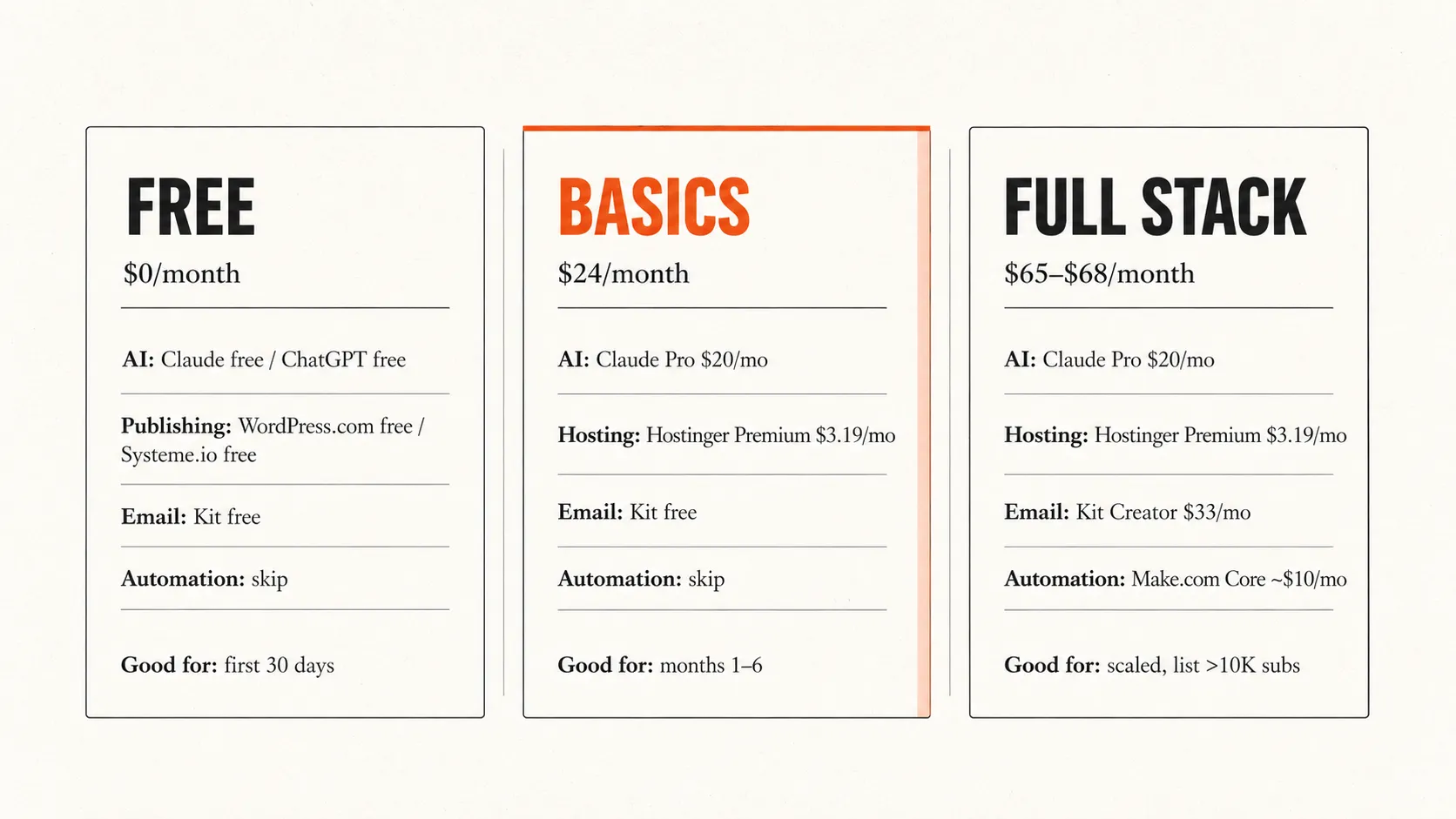
Free Tier, Paid Tier, or Delay — Tool-by-Tool
The principle underneath this whole article: start every layer of the stack on the free tier or the cheapest paid option, and upgrade only when a specific bottleneck makes the cost worth it. Most beginners skip this principle and pay for capability they can't use yet — software they're still learning, plans they don't fill, automations for workflows they haven't built.
The table below is the cost layout, tool by tool. Three columns: what's worth using on the free tier, what's worth paying for at the minimum useful level, and what's worth delaying until you have a specific trigger.
The "$24/mo basics" number means one paid AI assistant at $20/mo plus Hostinger Premium at $3.19/mo on the referral plan, rounded up. It assumes Kit stays free, automation is delayed, and the Year 1 domain is included with Hostinger.
| Tool category | Free tier | Minimum paid | Delay/skip until |
|---|---|---|---|
| AI assistant | ✓ ChatGPT free / Claude free | ✓ Claude Pro $20/mo OR ChatGPT Plus $20/mo | Daily context-limit friction is real |
| Publishing platform | ✓ WordPress.com free / Systeme.io free | ✓ Hostinger Premium $3.19/mo (12-month, with referral) — includes free domain Y1 | Only if practising; for a real affiliate site, upgrade before publishing |
| Email tool | ✓ Kit free tier — up to 10,000 subscribers | ✓ Kit Creator $33/mo (or $390/yr ≈ $32.50/mo annual) | List crosses 10K OR free-tier automation insufficient |
| Automation | ✗ none | ⏸ Make.com Core around $9–$11/mo for 10K credits, depending on monthly vs annual billing | Same multi-step task done manually 3× |
| Domain | ✗ none | ✓ ~$11/yr (NameCheap) OR free Y1 with Hostinger | (always required for a real site) |
| Monthly totals | $0 (with limits) | ~$24/mo basics · $65–$68/mo full paid | — |
✓ available · ⏸ delay until trigger · ✗ not applicable
Three things to read off the table:
The free-tier path is genuinely complete for the first month. A reader on ChatGPT free + WordPress.com free + Kit free + no automation can publish, capture leads, and send emails for $0/month. The limitations show up at scale, not at start. Use the free tier as your default until something specific breaks; don't treat free tier as a stepping stone you have to leave behind on a schedule.
The first paid upgrade should be your hosting, not your AI assistant. This goes against most beginner advice, and the reason matters. Hosting on a free tier (WordPress.com starter, free trial accounts) imposes restrictions on URL structure, plugin install, theme choice, and ad placement that limit what you can actually publish. The $3.19/mo for Hostinger Premium on a 12-month plan removes those restrictions and includes a free domain — you're paying for foundational publishing freedom, not for a marginal capability boost. By contrast, the AI free tier still covers short prompts, quick edits, and early outline work; the paid AI tier becomes urgent only when context limits interrupt long drafting sessions, multi-document research, or back-to-back article production. You can stay on free Claude or free ChatGPT longer than you can stay on a free hosting trial.
Don't pay for email or automation in the first thirty days. Kit's free tier covers ten thousand subscribers — most readers will not hit that ceiling for years. Make.com's free tier covers a thousand credits a month, which is more than enough for the kind of single-flow integrations you might actually need. Both upgrade decisions are triggered by specific events (list size, repeated manual work), not by a calendar.
That sequence — hosting first, AI second when daily friction kicks in, email and automation only on usage triggers — is the default upgrade order. The exception: if you find yourself capped out daily on the free AI tier in your first two weeks, upgrade the AI before the hosting. The default sequence assumes most beginners hit hosting friction first; if your bottleneck is AI capacity, follow your bottleneck, not the default.
If you run the full paid stack — Claude Pro, Hostinger Premium, Kit Creator, Make.com Core, and the amortised cost of a domain — your monthly cost lands between $65 and $68 depending on whether you pay monthly or annually for Kit and Make. That's the upper bound, the configuration of an operator who's writing weekly to a list larger than ten thousand and running automation that earns its $10/month. Most readers of this article will not be in that configuration for at least six months. Don't price your stack for where you want to be in 2027 — price it for where you actually are this month.
What to Build First, and When to Upgrade
You've picked the stack. Or you've at least decided which configuration you're working with — affiliate content site or simple service business. The next thirty days is execution, not more decisions.
The First 30 Days
What to actually build, in this order:
Week 1 — platform setup.
- Buy or claim the domain (free with Hostinger 12-month, or ~$11/year via NameCheap if you want it separate from the host).
- Install WordPress on Hostinger (one-click), or set up your Systeme.io account.
- Pick one theme — don't audition fifteen. Astra, GeneratePress, or Kadence are defensible defaults for WordPress; on Systeme.io, the built-in templates are fine.
- Wire up Google Analytics 4 and Google Search Console. Both free, both essential, both done in under an hour combined.
- Install one SEO plugin (Yoast or RankMath). Configure the basic settings. Stop there.
Week 2 — core pages.
- About page (one paragraph; who you are, what the site is for, no aspirational language).
- Affiliate disclosure page (legally required if you're using affiliate links — short, plain, factual).
- Privacy policy (use a free generator if you don't want to write one from scratch — Termly and Iubenda both have legitimate free tiers).
- Contact page (email or form, your call).
Week 3 — first three articles.
- Pick three articles that answer real BOFU questions in your niche. Don't start with "What is affiliate marketing" or "Top 10 AI tools" — both are oversaturated TOFU pieces beginners can't rank for. Start with comparisons or specific operator workflows you can describe from current experience.
- Internally link the three articles to each other. This is the cluster-building basics every beginner skips.
- Submit each URL to Google Search Console as soon as it's live.
Week 4 — capture infrastructure + first measurement.
- Set up the Kit free-tier capture form on three pages.
- Write one welcome email — short, honest, sets reader expectations for what you'll send.
- Open GA4. Look at what your three articles are doing. Don't expect traffic yet; you're checking that tracking works, not that it's converting.
That's the first thirty days. Four weeks, one focus per week, no automation, no email upgrades, no premium SEO suite. By end of Month 1 you should have a live site with five real pages, three articles, a working email capture, and tracking. That's a real online business in the operator sense — small, but real.
When to Upgrade
The right time to upgrade is when a specific bottleneck makes the cost worth it. Not before. Here are the specific triggers, by tool category:
Upgrade your AI assistant when you hit Claude or ChatGPT free-tier limits two days in a row during your normal writing routine. Not when you have spare cash. Free-tier limit friction means the tool is genuinely earning the upgrade.
Upgrade your hosting to Hostinger Cloud (or equivalent VPS) when your shared plan starts hitting traffic thresholds — typically around 25,000 monthly visitors for an article-heavy WordPress site. Symptoms: slow page load times during traffic spikes, intermittent 503 errors, support tickets about resource limits. Below that volume, shared hosting is correct.
Upgrade your email tool to Kit Creator when your list crosses ten thousand subscribers OR when you specifically need automation features the free tier won't run (multi-step sequences, conditional broadcasts, advanced segmentation). Without one of those triggers, you're paying $33/month for capability you can't use.
Pay for automation when you find yourself doing the same multi-step task by hand for the third time. Make.com Core at around $9–$11/month is the right tier for the kind of low-volume integration scenarios beginners actually run. For the Make.com vs Zapier decision in detail, see the dedicated comparison.
Add a premium SEO suite at Month 3, when you have at least ten articles published and need to find the next ten with confidence. Ahrefs, Semrush, or Moz Pro becomes worth the cost when keyword research and content-gap analysis are bottlenecks for your publishing decisions.
The pattern: upgrade follows usage, not the calendar. When in doubt, push the upgrade decision back another month. The compounding cost of premature paid tools across a 12-month build is what kills beginner online businesses far more often than slow growth.
For a worked example of how this thirty-day path actually plays out, see my own tool stack and the build log at devonkorr.com. Both are running approximately the configuration above. If you want the WordPress vs Systeme.io decision in detail before committing, the Systeme.io vs WordPress for Beginners comparison covers that head-to-head. And if you need to pick between Claude and ChatGPT before paying for one, Claude vs ChatGPT for affiliate content covers that decision.
The tools matter less than the discipline. Pick the small stack, ship articles, upgrade only when something concrete breaks. The rest is execution.