Comparison · For solo affiliate operators · 9 min read
Hostinger and Systeme.io: Do You Need Both or Just One?
Hostinger and Systeme.io aren't real alternatives — they solve different problems. The operator decision tree, lock-in trade-offs, and real cost.

Most Hostinger vs Systeme.io comparisons start from the wrong premise. These tools are not clean alternatives.
The aggregator pages on the first page of Google treat them like competing products. They aren’t. One is a domain registrar and hosting company. The other is an all-in-one marketing platform. Comparing them head-to-head is like comparing your electricity bill against your accounting software — they both cost money and they both affect your business, but they don’t do the same job.
The question worth asking isn’t “which one wins.” It’s “do I need both, or am I about to waste money and build a messy stack?”
If you read nothing else, read this:
| Reader type | Recommendation |
|---|---|
| Affiliate or content operator building email capture and offers | Use both |
| Pure blog or content site with no funnel, no list, no offer | Hostinger only |
| Creator selling courses, doesn’t care about owning a SEO content asset | Systeme.io may be enough alone |
| Existing Kajabi or Teachable user with working revenue | Do not migrate just to save money |
I use affiliate links for both tools, and I want to be upfront about that. The recommendation still depends on the business model, not the commission — I wouldn’t recommend running both if you only needed a simple content site, and I wouldn’t recommend Systeme.io to a creator who’s already monetizing on Kajabi without friction.
The rest of this is the operator case for why the right answer is usually “both, but configured deliberately” — and the cases where it’s not.
1. The Category Mistake: These Tools Don’t Compete
Every “Hostinger vs Systeme.io” article on the first page of Google starts from a category error.
Hostinger is an asset and control layer. It registers your domain, manages your DNS, and optionally hosts your website. Its job is to make sure you own the infrastructure your business sits on.
Systeme.io is a conversion and product layer. It builds funnels, runs email automations, hosts courses, runs your affiliate program, and processes checkouts. Its job is to turn visitors into leads and leads into customers.
Once you see the categories correctly, the “vs” framing collapses. The honest comparisons look like this:
| If you’re asking… | The honest comparison is… |
|---|---|
| Do I need domain registration and hosting? | Hostinger vs Bluehost vs SiteGround vs Namecheap |
| Do I need funnels, email, and course delivery? | Systeme.io vs Kajabi vs Teachable vs ClickFunnels |
| Do I need both layers of capability? | Hostinger + Systeme.io stack |
| Do I only need a simple blog? | Hostinger or WordPress or a static site, on its own |
| Do I only need a single funnel and an email list? | Systeme.io on its own may be enough |
(If the question you’re actually asking is “which one of these products should I use” rather than “how do these layers fit together,” start with the Systeme.io vs WordPress comparison — it covers the product-level decision. This article picks up where that one leaves off, on how to wire the layers together once you’ve chosen.)
Here’s the operator principle worth memorizing:
Never let the same tool own your domain, website, email list, funnels, course delivery, and checkout — unless the convenience premium is worth the lock-in.
All-in-one platforms (Kajabi, Teachable, Squarespace+Acuity bundles) charge you that convenience premium without naming it. The result is often painful migration later, whether or not that’s the stated design. The two-tool stack costs 30–60 minutes of setup once and saves you optionality for the life of the business.
2. The Operator Stack Map
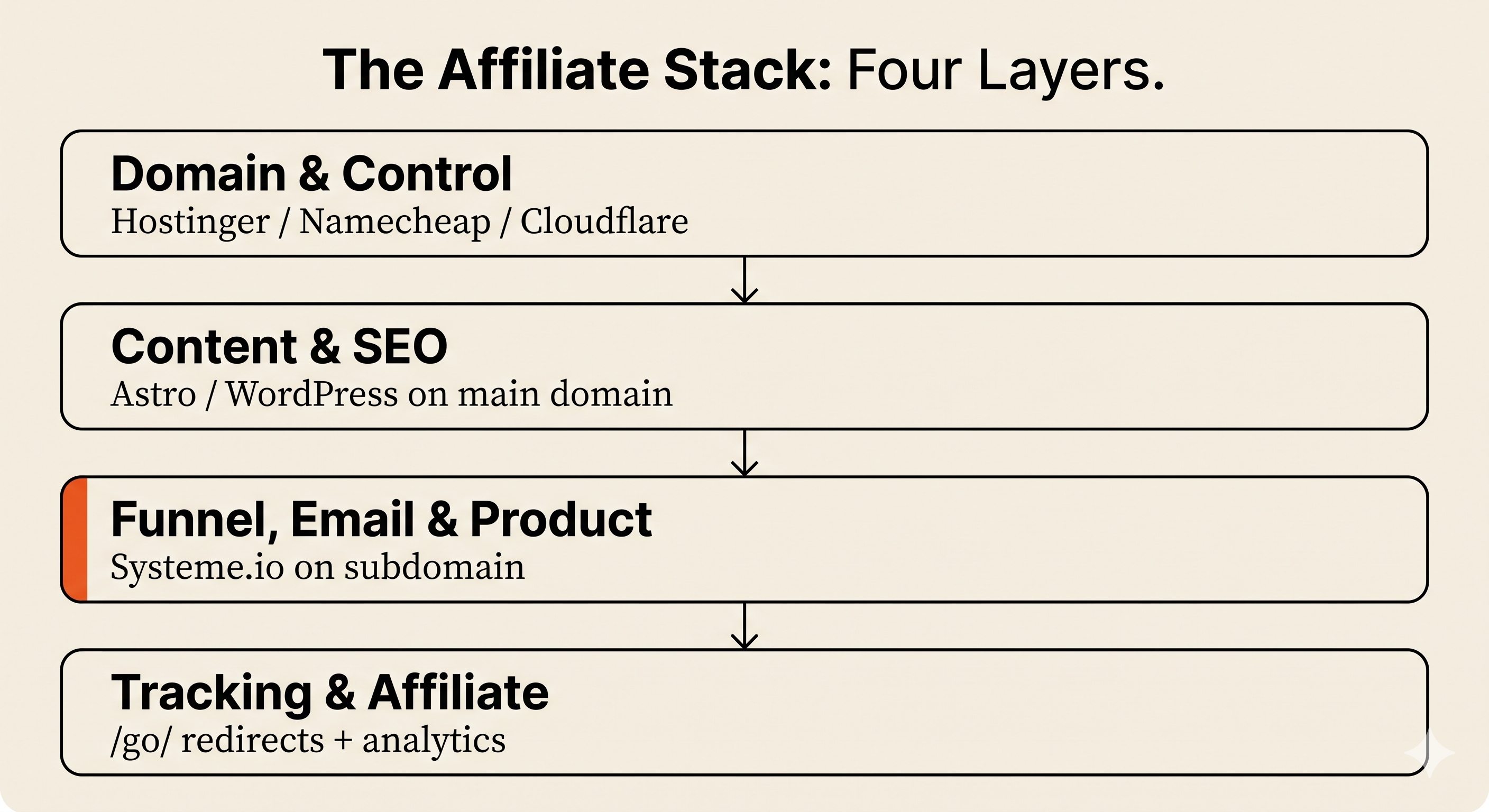
An AI-assisted affiliate business has four layers. Most beginners try to collapse them into one or two tools and end up either over-coupled or fragmented.
- Domain and control layer — your domain name, DNS records, and the authority over where traffic gets pointed. Lives at Hostinger (or any registrar — Hostinger is the one I use, but the same architecture works with Namecheap, Cloudflare, or another registrar).
- Content and SEO layer — the website where articles, comparisons, and reference content live. Sits on your main domain. In my case it’s an Astro site; for many operators it’s WordPress.
- Funnel, email, and product layer — lead magnets, opt-in funnels, email automations, course delivery, checkout, affiliate program management. Lives on Systeme.io, on a subdomain (more on that in Section 4).
- Tracking and affiliate layer —
/go/redirects, analytics, conversion tracking. Lives on the content-layer site, not inside Systeme.io.
Each layer is replaceable without breaking the others. Move your hosting and the domain stays. Move the funnel platform and your email list comes with you. Migrate the content site to a new framework and the funnels keep running.
That’s the map. The rest of the article is the case for why splitting the stack like this is the operator-correct default, and the cases where it’s not.
3. Why I Split the Stack Instead of Using One All-in-One Platform
Feature tables usually miss the real issue: what happens when one layer needs to change?
Five questions worth asking before any single platform owns multiple layers of your business:
- What happens if Systeme.io changes pricing? With a split stack, your content site and domain stay where they are. You re-evaluate the funnel layer in isolation. With an all-in-one, a price hike hits every layer at once.
- What happens if the funnel platform suspends your account? It happens, especially in adjacent verticals that trigger risk-flag heuristics. With a split stack, your content site keeps publishing and your email list export is your insurance policy. With an all-in-one, you can lose the entire business overnight.
- What happens if you want to move email or courses later? Email lists are exportable by design — but the automation logic, tags, sequences, and segmentation usually aren’t. The list is portable; the workflows usually aren’t. Easier when the funnel platform isn’t also your content host.
- What happens if Hostinger raises renewal pricing — or has its own control-layer problems? The domain is portable. Move it to Namecheap or Cloudflare in an afternoon. Funnels, email list, and content site don’t notice. This matters because Hostinger isn’t immune to control-layer issues either — there are operator reports of unexpected server IP changes breaking AdSense setups and annual renewal events disrupting email and website availability. The architecture stays the same with a different registrar; only the bill payer changes.
- What happens if the funnel tool owns the same DNS as your content site? Cleanup is painful — URL changes, redirect chains, broken internal links, temporary indexing issues. Avoid the situation entirely by keeping the funnel platform on a subdomain.
The asymmetry is what matters. Splitting the stack costs you 30–60 minutes of setup once. Consolidating into an all-in-one costs you optionality for the life of the business. If you outgrow Systeme.io’s email side, you migrate the list to Kit or MailerLite and keep funnels running. If you outgrow Hostinger as a host, you move hosting and keep the domain and DNS as configured. The stack is designed to let you upgrade one layer at a time.
4. Where Should Systeme.io Sit: Root Domain or Subdomain?
This is the implementation decision most operators don’t think about until it’s too late to change cleanly. The answer matters more than which platforms you pick.
| Configuration | When to use it | Trade-off |
|---|---|---|
| Root domain points to Systeme.io | Funnel-first business with no separate content site | You lose the SEO content asset; the root domain becomes a funnel page |
| www subdomain points to Systeme.io | Same as above, slightly cleaner URL handling | Same trade-off — the content layer has nowhere to live |
Subdomain like go.domain.com or offers.domain.com | Hybrid content + funnel business (the Devon Korr default) | Slightly more setup; correct default for affiliate operators |
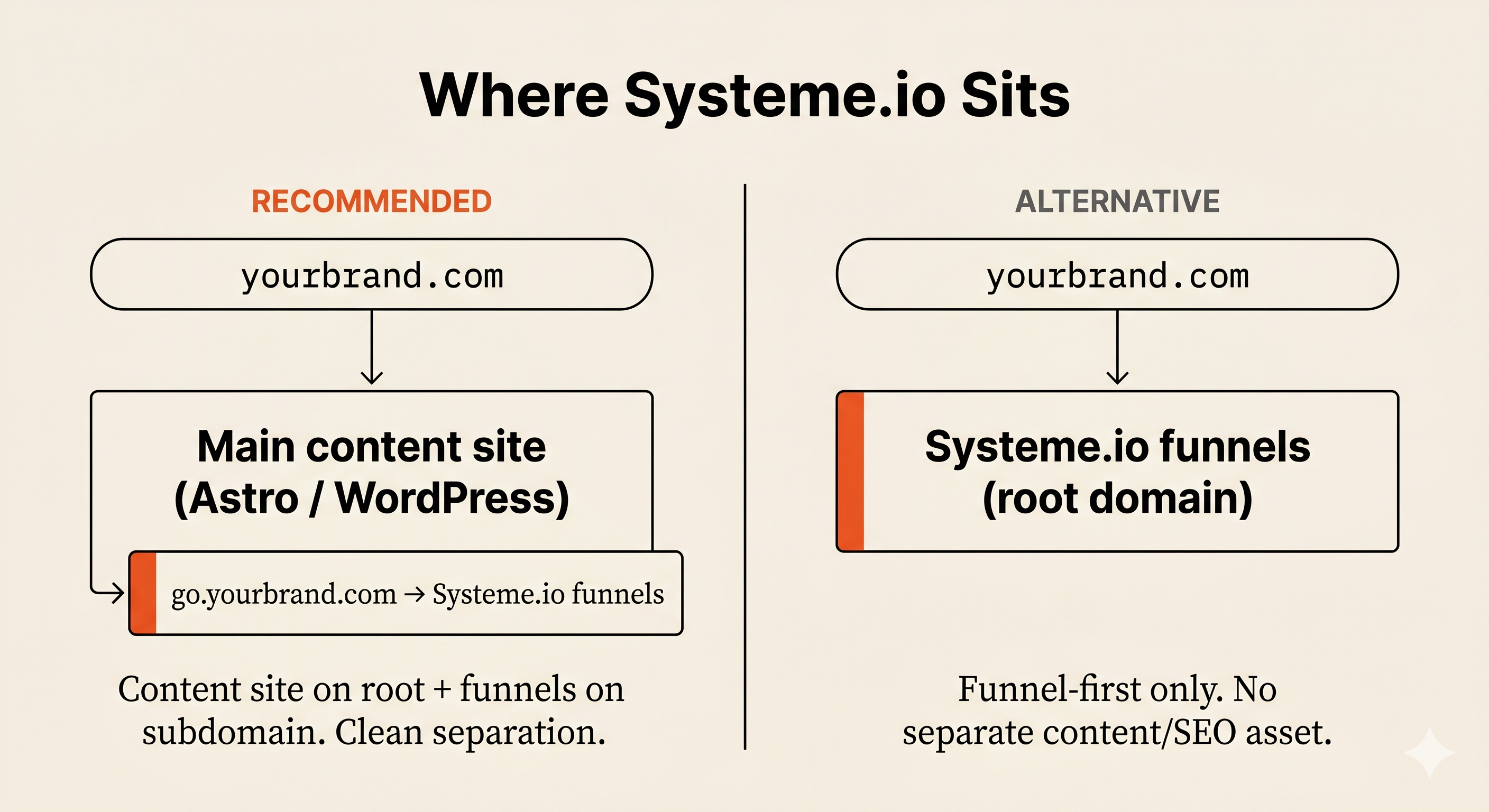
The opinionated answer: if you’re running an affiliate content operation, your main domain hosts the content site. Systeme.io lives on a branded subdomain. go.devonkorr.com reads as a deliberate link, not a sketchy redirect. Each subdomain convention signals intent — the reader sees go.yourbrand.com/some-offer and understands it’s a funnel; they see yourbrand.com/article and understand it’s content. Cleaner for user expectation and tracking.
There’s also a quieter benefit: if you ever migrate the funnel layer off Systeme.io, you only repoint the subdomain. The content site’s URL structure doesn’t change. Inbound links don’t break. SEO equity stays where it was.
The only case for putting Systeme.io on the root is if the entire business is funnel-first — selling a course, paid traffic, no SEO play. That’s a legitimate model. It just isn’t the model this stack is optimized for.
Objection: “Why not just use Systeme.io’s blog?”
Fair question — Systeme.io includes a blog on the free tier. Why pay for Hostinger separately and run a second site?
Systeme.io’s blog is good enough for funnel-adjacent content — landing pages, simple posts that support an offer. It isn’t built for a serious affiliate SEO operation. The content architecture, template control, technical SEO levers, and migration path are all weaker than purpose-built content setups. The content site does the SEO work. Systeme.io handles the conversion work. Each tool does what it’s actually good at.
If your business model is funnel-first (selling courses, running webinars, coaching), Systeme.io’s blog is enough. If it’s content-first (affiliate, depends on ranking for buyer-intent keywords), you need a separate content layer.
5. What Connecting Hostinger to Systeme.io Actually Involves
Official setup docs already exist at help.systeme.io and Hostinger’s support pages — I’m not going to re-document them. What’s worth writing about is what beginners trip over once they start the actual work.
The simple version is three steps: register the domain at Hostinger, add the right DNS records, verify the domain inside Systeme.io. The DNS layer needs a couple of CNAMEs pointing at Systeme.io’s CDN endpoint, plus one extra wrinkle: ten CAA records that allow Systeme.io’s certificate authority to issue an SSL certificate for your domain. Most setup guides bury this. The official Systeme.io docs mention it but not loudly enough.
The wrinkle most beginners underestimate is that DNS changes don’t take effect instantly. Propagation can take 24–48 hours depending on TTL settings and resolver caching. SSL certificate issuance can lag DNS propagation by an additional few hours. So even when you’ve done everything correctly, the domain can look broken for the rest of the day.
Here’s the specific moment when this clicked for me:
I expected the Hostinger → Systeme.io domain hookup to be a quick DNS swap, but the first real snag was SSL. I had to add multiple CAA records, and the certificate still didn’t issue immediately, which made the setup feel broken even though the DNS was technically correct. Then came the waiting: the change took roughly a day before everything propagated cleanly and the subdomain finally resolved without warnings. That delay was the first moment the process felt less like “click-to-connect” and more like real infrastructure work.
The takeaway: block 60–90 minutes for configuration, then expect a 1–2 day cooldown before the funnel domain is fully live with a clean SSL. Plan around that and the process feels normal. Don’t, and you’ll spend the cooldown convinced something’s broken.
Two other setup landmines worth naming. First, if you already have an SSL certificate on your root domain that isn’t a wildcard cert, pointing a new subdomain at Systeme.io can throw certificate-coverage errors because the existing cert doesn’t extend to the new hostname. Systeme.io issues its own cert for the subdomain, so this usually resolves itself during verification — but if you’re testing with curl or checking from a different machine while propagation is incomplete, you can see warnings that look like a configuration error and aren’t. Second, if you’re changing nameservers at the registrar level (not just adding records), be prepared to reconfigure MX records, SPF, DKIM, and DMARC for any email you send from the domain. Email deliverability quietly breaks after nameserver changes more often than beginners realize, and the fix sometimes means adding Cloudflare in front of the domain just to keep the DNS layer stable. That’s a hidden cost the “cheap stack” headline doesn’t capture.
One escape hatch if you genuinely don’t want to touch DNS: Systeme.io offers a free DNS setup service. You submit your domain credentials and they configure everything on their side. Reasonable choice if technical setup isn’t where you want to spend time — the trade is handing them temporary access to your domain settings.
6. The Real Cost of Running This Stack
The cost section is where most affiliate articles lose me. The headline number is always cherry-picked: a promotional first-year price, a free tier extrapolated forever, a comparison anchor pulled from the most expensive competitor.
I’m going to use renewal pricing — the prices that apply after the introductory promo ends.
Minimum cost before hosting, AI tools, email inbox, and paid upgrades
- Hostinger .com domain renewal: $19.99 USD per year, roughly $1.67 per month amortized.
- Systeme.io free tier: $0 per month, covering up to 2,000 contacts, 3 funnels, 1 custom domain, 1 automation rule, 1 blog, 1 course, 1 affiliate program.
Combined, that’s $1.67 per month for the minimum domain-and-funnel layer until you cross a free-tier ceiling. That’s not the whole stack — it’s the floor.
What this minimum excludes
| Excluded from $1.67/mo | Realistic monthly cost |
|---|---|
| Paid AI tools (Claude/Cowork, ChatGPT, Perplexity Pro, image generation) | $20–$200 |
| Email inbox hosting (Google Workspace or similar) | $6–$18 |
| Premium Systeme.io once you cross 2,000 contacts or 3 funnels | $14.17–$97/mo |
| Hosting for a separate content site (WordPress host, Cloudflare Pages for Astro, etc.) | $0–$15 |
| Image and video tools (Canva, Snagit, ElevenLabs, etc.) | $0–$80 |
| Payment processing fees | Percentage + fixed fee, varies by provider and country |
| Domain privacy, if billed separately | $0–$5 |
| Cloudflare or equivalent DNS layer (often needed after nameserver changes to keep MX/SPF/DKIM/DMARC stable) | $0–$20 |
| Taxes and VAT where applicable | Varies |
A realistic operating cost lands roughly $30–$50/mo lean (domain + free Systeme.io + one paid AI tool + inbox), $80–$150/mo active (add paid Systeme.io tier, design tools, automation), or $200+/mo for an aggressive AI/media stack.
Upgrade triggers (when Systeme.io’s free tier stops being enough)
- Email list crosses 2,000 contacts
- More than 3 active funnels needed
- More than 1 course product
- More than 1 automation rule
- A second custom domain needed
At that point, Systeme.io’s Startup plan is $17/month billed monthly or $170/year billed annually ($14.17/month). Annual billing also includes free migration if you’re moving from another platform.
The decision rule: upgrade when the limit blocks a revenue-generating action, not because you “might need it” soon.
The full comparison
| Stack model | Monthly cost profile | Best for | Where it breaks down |
|---|---|---|---|
| Hostinger + Systeme.io (free tier) | ~$1.67/mo | Beginner operators testing offers and email capture | More setup complexity; two systems to maintain; DNS mistakes can delay launch |
| WordPress + plugins | $10–$30/mo lean, $30–$80/mo with paid builder/email/funnel/course/SMTP, more with premium plugins | SEO-heavy content sites with design freedom needs | Plugin version-conflict maintenance, deliverability headaches |
| Kajabi (Basic) | $149/mo | Established course creators with revenue in place | Expensive before product-market fit; full-platform lock-in |
| Systeme.io only | $0–$97/mo (Free → Unlimited) | Funnel-first beginner with no SEO content play | Weak content asset control; blog module isn’t a serious SEO platform |
Operational risk map
| Risk | Hostinger only | Systeme.io only | Both |
|---|---|---|---|
| Lock-in exposure | Low | Medium/high | Medium |
| Setup complexity | Low–medium | Low | Medium |
| SEO control | High | Low–medium | High |
| Funnel and email speed | Low | High | High |
| Migration difficulty if you outgrow it | Medium | Medium/high | Lower — one layer at a time |
Feature counts don’t capture operational risk. The two-tool stack has more setup complexity than either single-tool option, but the migration math wins over a multi-year horizon.
7. When I Wouldn’t Use This Stack
This section exists to talk you out of the stack if it doesn’t fit. Without it, the article is just a sales pitch with a decision table.
Don’t use the Hostinger + Systeme.io stack if:
- You have no validated offer yet. Don’t buy anything. Build the offer first; the stack comes second.
- You hate DNS and will never touch technical setup. Use Systeme.io’s free DNS setup service or pick a single all-in-one. The lock-in trade is worth it if the alternative is never launching.
- You want one login, one vendor, one invoice. Kajabi or Teachable feel cleaner. You’ll pay more, accept more lock-in, and for some operators that’s the correct trade.
- You’re a pure SEO affiliate site with no list, no lead magnet, no offer. Systeme.io is unnecessary. Hostinger plus Astro or WordPress is enough. Add Systeme.io if you start capturing leads.
- You need real eCommerce. Catalog management, inventory, multi-currency, complex tax handling — Systeme.io is too light. Use Shopify or WooCommerce.
- You need deep CRM or sales-pipeline management. Systeme.io’s automation logic isn’t a CRM. Use HubSpot or Pipedrive.
- You already have revenue on another platform. Don’t migrate just to save $50/month. Migration risk is real. Working revenue beats slightly cheaper tooling. (One exception: Systeme.io’s annual plans include free migration assistance, which kills part of the friction argument if you’re seriously considering the move — but only if the platform fit is right, not just the price.)
- You need full design freedom. Systeme.io’s funnel templates are functional, not heavily customizable. If conversion depends on heavy design, the platform will frustrate you.
If any of these describe you, this stack isn’t right and you should stop reading. If none of them do, the configuration is in Section 8.
8. My Recommended Beginner Configuration
Recommended beginner configuration (what I’d build today on a fresh project):
- Domain — registered at Hostinger
- Main content site —
domain.comorwww.domain.com, on Astro or WordPress- Systeme.io funnels — on a subdomain like
go.domain.comoroffers.domain.com- Lead magnet delivery — inside Systeme.io
- Email automation — inside Systeme.io, on the free tier until you cross 2,000 contacts
- Affiliate links — for a content-led affiliate site, I prefer
/go/redirects on the content domain over Systeme.io-hosted routing- Upgrade triggers — list size, funnel count, or product complexity. Not time.
Each default is reversible without breaking the others. Swap the content framework without touching the funnel layer. Move the funnel layer without touching the domain. Migrate hosting without touching funnels, email list, or content. That’s the whole point.
One configuration choice worth defending: for a content-led affiliate site, run affiliate links through your content site’s /go/ redirects rather than through Systeme.io. Two reasons. First, you control the redirect file — if an affiliate program changes its URL structure or terminates, you update one place, not every funnel page. Second, the disclosure setup is operationally cleaner when the affiliate-link infrastructure lives on the same domain as the content that references them.
A disclosure operator note: whatever redirect structure you use, the disclosure needs to be visible before or near commercial links, not hidden only in the footer. That’s an FTC expectation, and it’s also good operator practice — readers should see the disclosure when they’re about to click, not after.
If you’re funnel-first instead of content-first, Section 4 has the alternate configuration — root domain to Systeme.io, no separate content layer.
9. How to Start Without Overbuilding
The trap most beginners fall into is building the full stack before they have a product, offer, or traffic. Don’t.
The right order:
- If you have neither domain nor offer: don’t buy anything. Spend the next two weeks finding the offer. The stack will still be here when you’re ready.
- If you have a lead magnet or offer concept but no domain yet: start with the Systeme.io free tier. You don’t need a custom domain on day one. Validate the offer, then add the domain when you’re committed.
- If you match the configuration in Section 8: register a domain at Hostinger (/go/hostinger) and sign up free at Systeme.io (/go/systemeio). Domain renewal is $19.99/year; the funnel layer is $0/month until you hit a free-tier limit.
Realistic timeline: DNS configuration is a 60–90 minute focused block. Then 24–48 hours of propagation where the domain looks broken and isn’t. Then the funnel is live and you can start sending traffic.
Closing
Hostinger and Systeme.io aren’t alternatives. They’re different layers of an affiliate stack. The right question isn’t “which one wins” — it’s “do I need both layers, or just one?”
If you’re building an AI-assisted affiliate business that captures email, runs offers, and publishes content, you need both — and Section 8 is the configuration to use. If you only need one layer, build that one. Don’t add complexity until your business model requires it.
Next reads worth queuing if you’re building this stack: the Astro vs WordPress comparison covers the content-layer decision, and the Kit vs MailerLite comparison covers the alternative if you migrate the email layer out of Systeme.io after scale. If this is your first encounter with the broader AI-assisted affiliate approach, the AI Tool Stack for Beginners pillar covers the prerequisites.
Affiliate disclosure: I use affiliate links for both Hostinger and Systeme.io. Full disclosure at the affiliate disclosure page. The architecture argument stands whether you use my links or not.